


Abstract
Mono-spaced Bold
To see the contents of the filemy_next_bestselling_novelin your current working directory, enter thecat my_next_bestselling_novelcommand at the shell prompt and press Enter to execute the command.
Press Enter to execute the command.Press Ctrl+Alt+F2 to switch to a virtual terminal.
mono-spaced bold. For example:
File-related classes includefilesystemfor file systems,filefor files, anddirfor directories. Each class has its own associated set of permissions.
Choose → → from the main menu bar to launch Mouse Preferences. In the Buttons tab, select the Left-handed mouse check box and click to switch the primary mouse button from the left to the right (making the mouse suitable for use in the left hand).To insert a special character into a gedit file, choose → → from the main menu bar. Next, choose → from the Character Map menu bar, type the name of the character in the Search field and click . The character you sought will be highlighted in the Character Table. Double-click this highlighted character to place it in the Text to copy field and then click the button. Now switch back to your document and choose → from the gedit menu bar.
Mono-spaced Bold Italic or Proportional Bold Italic
To connect to a remote machine using ssh, typessh username@domain.nameat a shell prompt. If the remote machine isexample.comand your username on that machine is john, typessh john@example.com.Themount -o remount file-systemcommand remounts the named file system. For example, to remount the/homefile system, the command ismount -o remount /home.To see the version of a currently installed package, use therpm -q packagecommand. It will return a result as follows:package-version-release.
Publican is a DocBook publishing system.
mono-spaced roman and presented thus:
books        Desktop   documentation  drafts  mss    photos   stuff  svn
books_tests  Desktop1  downloads      images  notes  scripts  svgs
mono-spaced bold and the output of a command in mono-spaced roman. Examples:
0 root@cl-head ~ #echo "I'm executed by root on a head-node"I'm executed by root on a head-node
0 root@beo-01 ~ #echo "I'm executed by root on a compute node"I'm executed by root on a compute node
0 root@sn-1 ~ #echo "I'm executed by root on a storage node"I'm executed by root on a storage node
0 user@workstation ~ $echo "I'm executed by user admin on the admins workstation"I'm executed by user admin on the admins workstation
mono-spaced roman but add syntax highlighting as follows:
package org.jboss.book.jca.ex1;
import javax.naming.InitialContext;
public class ExClient
{
public static void main(String args[])
throws Exception
{
InitialContext iniCtx = new InitialContext();
Object ref = iniCtx.lookup("EchoBean");
EchoHome home = (EchoHome) ref;
Echo echo = home.create();
System.out.println("Created Echo");
System.out.println("Echo.echo('Hello') = " + echo.echo("Hello"));
}
}
Note
Important
Warning
qlustar-docs@qlustar.com to report errors or missing pieces in this documentation.
Note
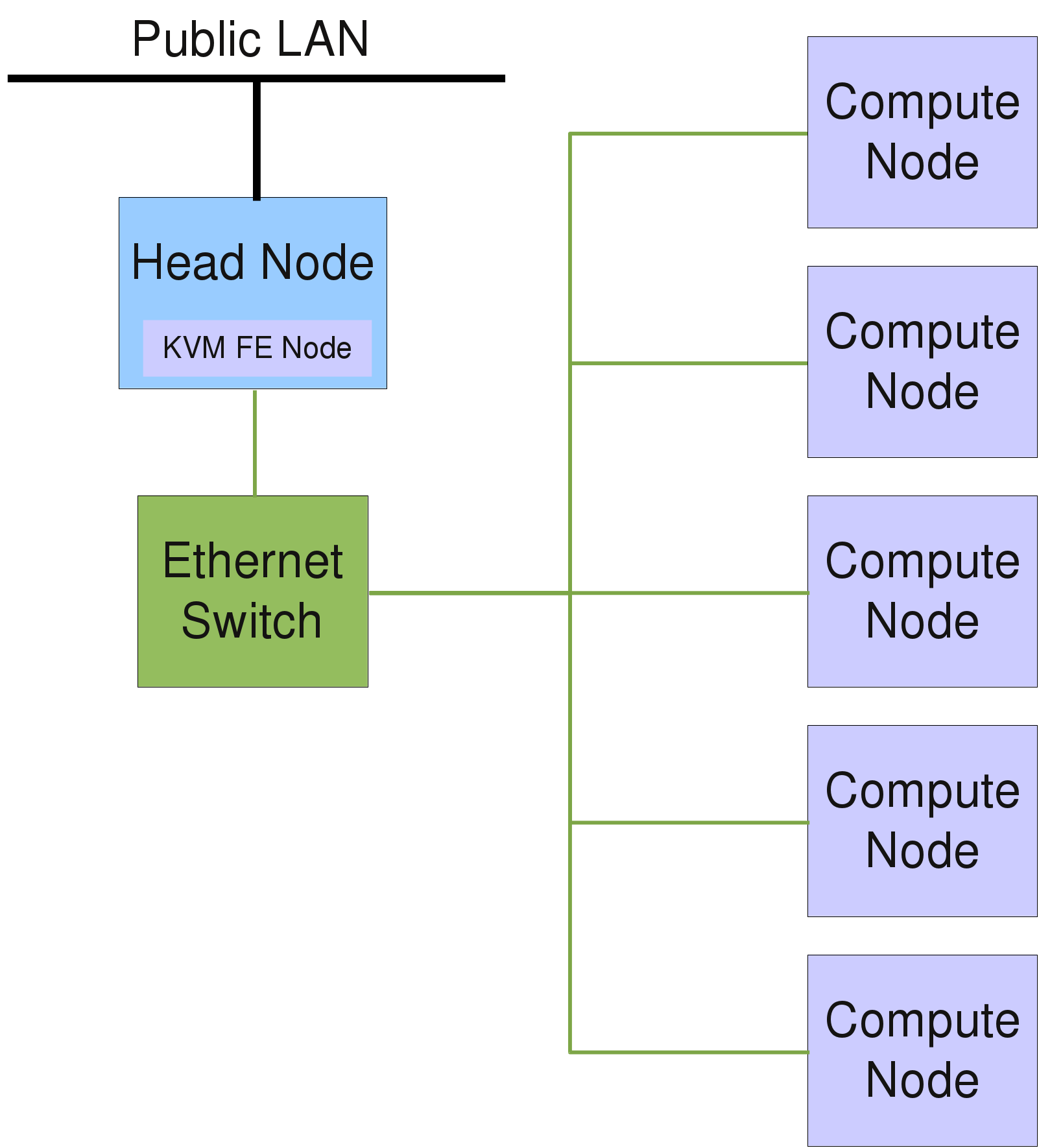
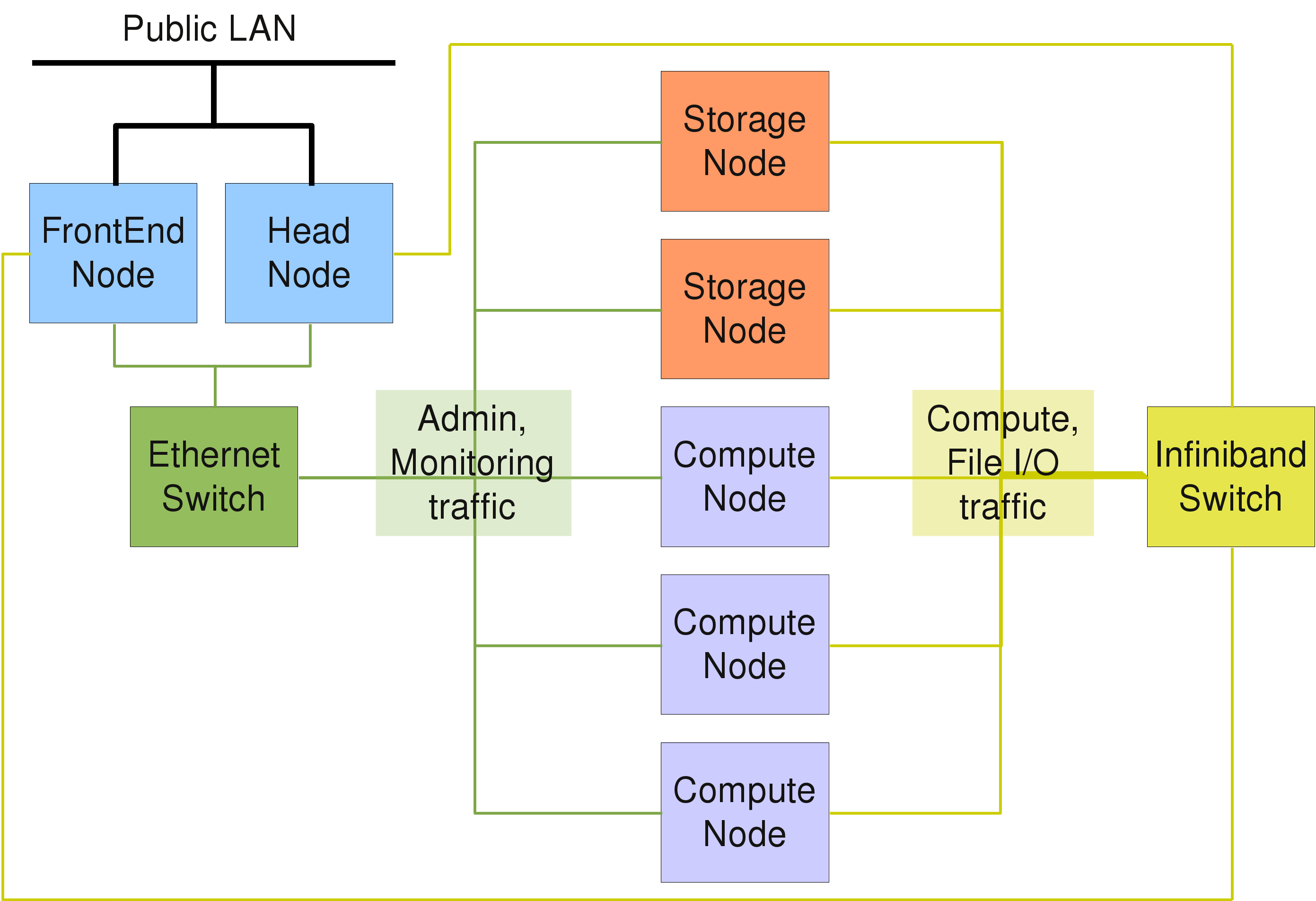
/etc/network/interfaces (type man interfaces for details), while /etc/resolv.conf is the key-control file regarding the DNS configuration (see Section 2.1.2, “DNS”). Network interfaces can be brought up or down using the commands ifup and ifdown (see also the corresponding man pages). Typically, the head-node has at least two network interfaces, one for the external LAN and one for the internal cluster network. For all cluster-internal networks (boot/NFS, optional Infiniband and/or IPMI), unofficial (not routed) IP addresses are used, usually in the range 192.168.x.0/255.255.255.0, while for larger clusters the range 172.16.y.0/255.255.0.0 is often used. In the latter case, y might indicate the rack number.
Note
/etc/resolv.conf contains the addresses of the DNS servers to use and a list of domain names to search when looking up a short (not fully qualified) hostname. Example:
search your.domain
nameserver 127.0.0.1
Note
/etc/resolv.conf is automatically generated. The DNS configuration must be configured directly in /etc/network/interfaces by adding dns- option lines to the relevant iface stanza. The following option names are supported: dns-nameservers, dns-search, and dns-sortlist. Get more details on these options by executing man resolvconf. The dns-nameservers entry is added and configured automatically to use 127.0.0.1 (the head-node's dnsmasq instance) during installation.
Note
/etc/dnsmasq.d/01-dhcpd.conf and is auto-generated by QluMan.
Note
/etc/network/interfaces (cluster network address is 192.168.97.0/24) shows, how masquerading is activated on boot and disabled on shutdown:
iface br-ext inet static
  address 192.168.55.44
  netmask 255.255.255.0
  broadcast 192.168.55.255
  gateway 192.168.55.254
  dns-nameservers 127.0.0.1
  bridge_ports enp0s4
  bridge_stp off
  bridge_fd 0
  bridge_maxwait 0
  up iptables -t nat -A POSTROUTING -s 192.168.97.0/24 \
    -o br-ext -j MASQUERADE
  down iptables -t nat -D POSTROUTING -s 192.168.97.0/24 \
    -o br-ext -j MASQUERADE
/etc/ntp.conf and add a line for every ntp-server (example ntp-1) to be contacted:
server ntp-1
/etc/fstab. All file-systems are of type ext4 unless requested otherwise.
Note
qlustar-initial-config during installation. In case of a HA head-node setup, the second head-node becomes a NIS slave server.
/var/yp and the corresponding source files in the directory /etc/qlustar/yp. The passwd and shadow tables are updated automatically by the script adduser.sh when users are added (see Section 6.1.1, “Adding User Accounts”). Apart from that, usually nothing needs to be changed in the provided NIS configuration.
/etc/qlustar/yp/shadow should be readable and writable only by root. In case NIS source files have been changed manually, the command make -C /var/yp must be executed to regenerate the maps and activate the changes. For more detailed information about NIS, you may also consult the NIS package HowTo at /usr/share/doc/nis/nis.debian.howto.gz.
/etc/ypserv.securenets (see man ypserv).
/etc/yp.conf. The NIS domain name is set in /etc/defaultdomain and usually defined as qlustar. On cluster nodes booting over the network, these settings are all configured automatically by DHCP (see also Section 2.1.3, “DHCP”).
NFS (Network File System) services to the compute-nodes. The kernel NFS server with protocol version 3 is used for accomplishing this goal. The typical Qlustar directory structure consists of three file-systems that are exported by the head-node via NFS to all other nodes: /srv/apps, /srv/data and /srv/ql-common.
Note
/srv is used for this purpose.
/srv/apps and /srv/data are typically separate file-systems on the head-node, the entry /srv/ql-common is a bind mount of the global Qlustar configuration directory /etc/qlustar/common. This mount is created as a result of the following entry in /etc/fstab:
/etc/qlustar/common /srv/ql-common none bind 0 0
/etc/exports. Execute man exports for a detailed explanation of the corresponding syntax. For security reasons, access to shared file-systems should be limited to trusted networks. The directory /srv is exported with a special parameter fsid. An export entry with the parameter no_root_squash for a host will enable full write access for the root user on that host (without that parameter, root is mapped to the user nobody on NFS mounts). In the following example, root on the host login-c (default name of the FrontEnd node) will have full write access to all exported file-systems:
/srv login-c(async,rw,no_subtree_check,fsid=0,insecure,no_root_squash)\
  192.168.52.0/24(async,rw,no_subtree_check,fsid=0,insecure)
/srv/data login-c(async,rw,no_subtree_check,insecure,nohide,no_root_squash)\
  192.168.52.0/24(async,rw,no_subtree_check,insecure,nohide)
/srv/apps login-c(async,rw,no-subtree_check,insecure,nohide,no_root_squash)\
  192.168.52.0/24(async,rw,no_subtree_check,insecure,nohide)
/srv/ql-common login-c(async,rw,subtree_check,insecure,nohide,no_root_squash)\
  192.168.52.0/24(async,ro,subtree_check,insecure,nohide)
0 root@cl-head ~ #service nfs-kernel-server reload
AgentForwarding and X11Forwarding. This way, X11 programs can be executed without any further hassle from any compute-node with the X display appearing on a users workstation in the LAN. The relevant ssh configuration files are /etc/ssh/sshd_config and /etc/ssh/ssh_config.
/root/.ssh/authorized_keys on any netboot node during its boot process.
ssh_known_hosts containing all hosts keys in the cluster must exist. It is automatically generated by QluMan, placed into the directory /etc/qlustar/common/image-files/ssh and linked to /etc/ssh/ssh_known_hosts on netboot nodes.
HostbasedAuthentication must be set to yes in /etc/ssh/sshd_config on the clients. This is the default in Qlustar. Furthermore, the file /etc/ssh/shosts.equiv must contain the hostnames of all hosts from where login should be allowed. This file is also automatically generated by QluMan. Note that this mechanism works for ordinary users but not for the root user.
postfix is setup on the head-node. Typically it is configured to simply transfer all mail to a central mail relay, whose name can be entered during installation. The main postfix configuration file is /etc/postfix/main.cf. Mail aliases can be added in /etc/aliases (initial aliases were configured during installation). A change in this file requires execution of the command postalias /etc/aliases to activate the changes. Have a look at Mail Transport Agent to find out, how to configure mail on the compute-nodes.
0 root@cl-head ~ #ibstatCA 'mlx4_0' CA type: MT26428 Number of ports: 1 Firmware version: 2.7.0 Hardware version: b0 Node GUID: 0x003048fffff4cb8c System image GUID: 0x003048fffff4cb8f Port 1: State: Active Physical state: LinkUp Rate: 40 Base lid: 310 LMC: 0 SM lid: 1 Capability mask: 0x02510868 Port GUID: 0x003048fffff4cb8d Link layer: InfiniBand
0 root@cl-head ~ #cat /sys/class/infiniband/mlx4_0/ports/1/rate40 Gb/sec (4X QDR)0 root@cl-head ~ #cat /sys/class/infiniband/mlx4_0/ports/1/state4: ACTIVE0 root@cl-head ~ #cat /sys/class/infiniband/mlx4_0/ports/1/phys_state5: LinkUp0 root@cl-head ~ #cat /sys/class/infiniband/mlx4_0/board_idSM_21220000010000 root@cl-head ~ #cat /sys/class/infiniband/mlx4_0/fw_ver2.7.0
0 root@cl-head ~ #ibv_devinfohca_id: mlx4_0 fw_ver: 2.7.000 node_guid: 0030:48ff:fff4:cb8c sys_image_guid: 0030:48ff:fff4:cb8f vendor_id: 0x02c9 vendor_part_id: 26428 hw_ver: 0xB0 board_id: SM_2122000001000 phys_port_cnt: 1 port: 1 state: PORT_ACTIVE (4) max_mtu: 2048 (4) active_mtu: 2048 (4) sm_lid: 1 port_lid: 310 port_lmc: 0x00
0 root@cl-head ~ #ibv_devicesdevice node GUID ------ ---------------- mlx4_0 003048fffff4cb8c
0 root@cl-head ~ #ifconfig ib0ib0 Link encap:UNSPEC HWaddr 80-00-00-48-FE-80-00-00-00-00-00-00-00-00-00-00 inet addr:172.17.7.105 Bcast:172.17.127.255 Mask:255.255.128.0 UP BROADCAST RUNNING MULTICAST MTU:2044 Metric:1 RX packets:388445 errors:0 dropped:0 overruns:0 frame:0 TX packets:34 errors:0 dropped:0 overruns:0 carrier:0 collisions:0 txqueuelen:256 RX bytes:39462502 (39.4 MB) TX bytes:2040 (2.0 KB)
0 root@cl-head ~ #ibswitchesSwitch : 0x0002c902004885b0 ports 36 "MF0;cluster-ibs:IS5300/L18/U1" base port 0 lid 17 lmc 0 Switch : 0x0002c90200488f60 ports 36 "MF0;cluster-ibs:IS5300/L17/U1" base port 0 lid 22 lmc 0 Switch : 0x0002c902004885a8 ports 36 "MF0;cluster-ibs:IS5300/L16/U1" base port 0 lid 16 lmc 0 Switch : 0x0002c90200488fc8 ports 36 "MF0;cluster-ibs:IS5300/L15/U1" base port 0 lid 26 lmc 0 Switch : 0x0002c902004885a0 ports 36 "MF0;cluster-ibs:IS5300/L14/U1" base port 0 lid 15 lmc 0 Switch : 0x0002c90200488fc0 ports 36 "MF0;cluster-ibs:IS5300/L13/U1" base port 0 lid 25 lmc 0 Switch : 0x0002c902004884e0 ports 36 "MF0;cluster-ibs:IS5300/L12/U1" base port 0 lid 10 lmc 0 Switch : 0x0002c90200488f68 ports 36 "MF0;cluster-ibs:IS5300/L11/U1" base port 0 lid 23 lmc 0 Switch : 0x0002c90200488510 ports 36 "MF0;cluster-ibs:IS5300/L10/U1" base port 0 lid 12 lmc 0 Switch : 0x0002c902004885e8 ports 36 "MF0;cluster-ibs:IS5300/L09/U1" base port 0 lid 19 lmc 0 Switch : 0x0002c90200488f78 ports 36 "MF0;cluster-ibs:IS5300/L08/U1" base port 0 lid 24 lmc 0 Switch : 0x0002c90200488598 ports 36 "MF0;cluster-ibs:IS5300/L07/U1" base port 0 lid 14 lmc 0 Switch : 0x0002c90200488fd8 ports 36 "MF0;cluster-ibs:IS5300/L06/U1" base port 0 lid 27 lmc 0 Switch : 0x0002c902004885f8 ports 36 "MF0;cluster-ibs:IS5300/L05/U1" base port 0 lid 21 lmc 0 Switch : 0x0002c902004885f0 ports 36 "MF0;cluster-ibs:IS5300/L03/U1" base port 0 lid 20 lmc 0 Switch : 0x0002c90200488528 ports 36 "MF0;cluster-ibs:IS5300/L02/U1" base port 0 lid 13 lmc 0 Switch : 0x0002c902004885e0 ports 36 "MF0;cluster-ibs:IS5300/L01/U1" base port 0 lid 18 lmc 0 Switch : 0x0002c90200472eb0 ports 36 "MF0;cluster-ibs:IS5300/S09/U1" base port 0 lid 4 lmc 0 Switch : 0x0002c90200472f08 ports 36 "MF0;cluster-ibs:IS5300/S08/U1" base port 0 lid 9 lmc 0 Switch : 0x0002c90200472ec8 ports 36 "MF0;cluster-ibs:IS5300/S07/U1" base port 0 lid 7 lmc 0 Switch : 0x0002c90200472ed0 ports 36 "MF0;cluster-ibs:IS5300/S06/U1" base port 0 lid 8 lmc 0 Switch : 0x0002c90200472ec0 ports 36 "MF0;cluster-ibs:IS5300/S05/U1" base port 0 lid 6 lmc 0 Switch : 0x0002c90200472eb8 ports 36 "MF0;cluster-ibs:IS5300/S04/U1" base port 0 lid 5 lmc 0 Switch : 0x0002c9020046cc60 ports 36 "MF0;cluster-ibs:IS5300/S03/U1" base port 0 lid 2 lmc 0 Switch : 0x0002c9020046cd58 ports 36 "MF0;cluster-ibs:IS5300/S02/U1" base port 0 lid 3 lmc 0 Switch : 0x0002c90200479668 ports 36 "MF0;cluster-ibs:IS5300/S01/U1" enhanced port 0 lid 1 lmc Switch : 0x0002c90200488500 ports 36 "MF0;cluster-ibs:IS5300/L04/U1" base port 0 lid 11 lmc 0
0 root@cl-head ~ #ibnodes | head -10Ca : 0x0002c902002141f0 ports 1 "MT25204 InfiniHostLx Mellanox Technologies" Ca : 0x0002c90200214150 ports 1 "MT25204 InfiniHostLx Mellanox Technologies" Ca : 0x0002c9020021412c ports 1 "MT25204 InfiniHostLx Mellanox Technologies" Ca : 0x0002c90200214164 ports 1 "MT25204 InfiniHostLx Mellanox Technologies" Ca : 0x0002c902002141c8 ports 1 "MT25204 InfiniHostLx Mellanox Technologies" Ca : 0x0002c9020020d82c ports 1 "MT25204 InfiniHostLx Mellanox Technologies" Ca : 0x0002c9020020d6c0 ports 1 "MT25204 InfiniHostLx Mellanox Technologies" Ca : 0x0002c90200216eb8 ports 1 "MT25204 InfiniHostLx Mellanox Technologies" Ca : 0x0002c9020021413c ports 1 "MT25204 InfiniHostLx Mellanox Technologies" Ca : 0x002590ffff2fc5f4 ports 1 "MT25408 ConnectX Mellanox Technologies"
0 root@cl-head ~ #ibnetdiscover | head -40# Topology file: generated on Thu Oct 10 14:06:20 2013 # # Initiated from node 0002c903000c817c port 0002c903000c817d vendid=0x2c9 devid=0xbd36 sysimgguid=0x2c90200479470 switchguid=0x2c902004885b0(2c902004885b0) Switch 36 "S-0002c902004885b0" # "MF0;cluster-ibs:IS5300/L18/U1" base port 0 lid 17 lmc 0 [19] "S-0002c90200479668"[35] # "MF0;cluster-ibs:IS5300/S01/U1" lid 1 4xQDR [20] "S-0002c90200479668"[36] # "MF0;cluster-ibs:IS5300/S01/U1" lid 1 4xQDR [21] "S-0002c9020046cd58"[35] # "MF0;cluster-ibs:IS5300/S02/U1" lid 3 4xQDR [22] "S-0002c9020046cd58"[36] # "MF0;cluster-ibs:IS5300/S02/U1" lid 3 4xQDR [23] "S-0002c9020046cc60"[35] # "MF0;cluster-ibs:IS5300/S03/U1" lid 2 4xQDR [24] "S-0002c9020046cc60"[36] # "MF0;cluster-ibs:IS5300/S03/U1" lid 2 4xQDR [25] "S-0002c90200472eb8"[35] # "MF0;cluster-ibs:IS5300/S04/U1" lid 5 4xQDR [26] "S-0002c90200472eb8"[36] # "MF0;cluster-ibs:IS5300/S04/U1" lid 5 4xQDR [27] "S-0002c90200472ec0"[35] # "MF0;cluster-ibs:IS5300/S05/U1" lid 6 4xQDR [28] "S-0002c90200472ec0"[36] # "MF0;cluster-ibs:IS5300/S05/U1" lid 6 4xQDR [29] "S-0002c90200472ed0"[35] # "MF0;cluster-ibs:IS5300/S06/U1" lid 8 4xQDR [30] "S-0002c90200472ed0"[36] # "MF0;cluster-ibs:IS5300/S06/U1" lid 8 4xQDR [31] "S-0002c90200472ec8"[35] # "MF0;cluster-ibs:IS5300/S07/U1" lid 7 4xQDR [32] "S-0002c90200472ec8"[36] # "MF0;cluster-ibs:IS5300/S07/U1" lid 7 4xQDR [33] "S-0002c90200472f08"[35] # "MF0;cluster-ibs:IS5300/S08/U1" lid 9 4xQDR [34] "S-0002c90200472f08"[36] # "MF0;cluster-ibs:IS5300/S08/U1" lid 9 4xQDR [35] "S-0002c90200472eb0"[35] # "MF0;cluster-ibs:IS5300/S09/U1" lid 4 4xQDR [36] "S-0002c90200472eb0"[36] # "MF0;cluster-ibs:IS5300/S09/U1" lid 4 4xQDR vendid=0x2c9 devid=0xbd36 sysimgguid=0x2c90200479470 switchguid=0x2c90200488f60(2c90200488f60) Switch 36 "S-0002c90200488f60" # "MF0;cluster-ibs:IS5300/L17/U1" base port 0 lid 22 lmc 0 [1] "H-0002c9020021413c"[1](2c9020021413d) # "MT25204 InfiniHostLx Mellanox Technologies" lid 284 4xDDR [2] "H-0002c90200216eb8"[1](2c90200216eb9) # "MT25204 InfiniHostLx Mellanox Technologies" lid 241 4xDDR [3] "H-0002c9020020d6c0"[1](2c9020020d6c1) # "MT25204 InfiniHostLx Mellanox Technologies" lid 244 4xDDR [4] "H-0002c9020020d82c"[1](2c9020020d82d) # "MT25204 InfiniHostLx Mellanox Technologies" lid 242 4xDDR [6] "H-0002c902002141c8"[1](2c902002141c9) # "MT25204 InfiniHostLx Mellanox Technologies" lid 243 4xDDR [9] "H-0002c90200214164"[1](2c90200214165) # "MT25204 InfiniHostLx Mellanox Technologies" lid 293 4xDDR
0 root@cl-head ~ #ibcheckstate## Summary: 215 nodes checked, 0 bad nodes found ## 1024 ports checked, 0 ports with bad state found
0 root@cl-head ~ #ibcheckwidth## Summary: 215 nodes checked, 0 bad nodes found ## 1024 ports checked, 0 ports with 1x width in error found
/init is executed as the initial init process. This script sets up the unionFS filesystem structure as well as basic networking functionality and finally starts the Qlustar multicast client to download the real OS image assigned to the node and delivered by the Qlustar multicast image server ql-mcastd. This image is unpacked into the path /union/image.
/sbin/init.qlustar.
/sbin/init.qlustar first executes systemd-udevd to trigger the auto-loading of kernel drivers and then starts QluMan execd in a one-shot configure-mode. Hereby QluMan execd a) receives all the node-specific options from qlumand running on the head-node and b) executes corresponding scripts to process the options received.
Network FS mounts, pam customization, sssd customization, OpenSM configuration (if desired) and a check whether NTP can synchronize the time from the head-node(s).
/var/log/qlustar. Adding the parameter early-shell to the kernel cmdline, will interrupt the boot process when entering /sbin/init.qlustar and give the opportunity to debug in case of possible problems. The kernel parameter debug will produce lots of debug messages during this phase.
systemd as the final init process. From here on, the boot procedure proceeds in the standard Linux fashion.
Note
TFTP server component of dnsmasq transfers the boot image to the compute-nodes. All files that should be served by tftp must reside in the directory /var/lib/tftpboot. On a Qlustar installation, it contains three symbolic links:
pxelinux.0 ->/usr/lib/syslinux/pxelinux.0pxelinux.cfg ->/etc/qlustar/pxelinux.cfgqlustar ->/var/lib/qlustar
/etc/qlustar/pxelinux.cfg contains the PXE boot configuration files for the compute-nodes. There is a default configuration that applies to any node without an assigned custom boot configuration in QluMan. For every host with a custom boot configuration, QluMan adds a symbolic link pointing to the actual configuration file. The links are named after the node's Hostid, which you can find out with the gethostip command. For more details about how to define boot configurations see the corresponding section of the QluMan Guide.
Note
/etc/shadow file and is therefore the same as on the head-node(s). If you want to change this, you can call qlustar-image-reconfigure <image-name>. (Replacing <image-name> with the actual name of the image). You can then specify a different root password for the node OS image.
/usr/share/doc/qlustar-image. The main changelog file is core.changelog.gz. The other files are automatically generated. The files *.packages.version.gz lists the packages each module is made of. The files *.contents.changelog*.gz lists the files that were changed between each version, and *.packages.changelog*.gz list differences in the package list and versions. Hence, you always have detailed information about what has been changed in new images as well as the package sources of their content.
/some/path/filename to all images execute:
0 root@cl-head ~ #qlustar-image-edit -e /some/path/filename
0 root@cl-head ~ #qlustar-image-edit -e img /some/path/filename
/etc/qlustar/images on the head-node, either in the sub-directory common (for files entering all images) or in the sub-directory img (for files entering just the image img).
/etc/qlustar/images/common/copy/some/path/filename or /etc/qlustar/images/img/copy/some/path/filename respectively. To undo adding such files to the images, simply remove these files.
To edit the squashfs OS image do:0 root@cl-head ~ #qlustar-image-edit -i img
In both cases, you will be placed into the root directory of the corresponding initrd/image. You can then manipulate any file in the initrd/image or add new ones to it. When done, enter0 root@cl-head ~ #qlustar-image-edit -s img
exit and the initrd/image will be regenerated.
Warning
/etc/qlustar/options.d. The following is a list of these tasks:
/etc/network/interfaces.d/qluman, for CentOS in adapter specific files under /etc/sysconfig/network-scripts.
/etc/qlustar/options.d/disk-config for later use by the disk initialization script.
/root/.ssh/authorized_keys.
/etc/qlustar/options or in a separate file in the directory /etc/qlustar/options.d of the nodes root filesystem. Usual BASH shell syntax is used for the options.
Note
/etc/qlustar/options as well as the config files generated in /etc/qlustar/options.d should usually not be edited manually. However, when a node has trouble starting certain services or configuring some system components, it can make sense to inspect and possibly change the settings in these files to see whether that solves the problem. Please report such a situation as a bug, so that it can be fixed in a future release.
/etc/qlustar/common contains cluster-wide configuration files for the nodes. At an early stage of the boot process, this directory is mounted via NFS from the head-node. If required, the path on the head-node this directory is exported from, can be customized with QluMan.
/etc/qlustar/common/rc.boot) is searched for executable scripts in a late phase of the boot process (after unionFS is fully initialized, so that you can use programs from the chroot here as well). The scripts found are then executed one by one. You can use this mechanism to perform arbitrary modifications/customization of the compute node OS.
Note
/etc/qlustar/common/rc.boot must be executable and conform to the naming standard that the command run-parts defines (see man run-parts on the head-node).
/lib/qlustar/copy-files, which is also executed at boot, consults a configuration file /etc/qlustar/common/image-files/destinations, where each line describes a directory to be created, a file to be copied from an NFS path to a local path, or a link that needs to be created in the RAMdisk. Example:
# remotefile is a path relative to /etc/qlustar/common/image-files
# and destdir is the absolute path of the directory where remotefile
# should be copied to. mode is used as input to chmod.
# Example:
# authorized_keys   /root/.ssh    root:root   600

# Directories
/etc/ldap

# remotefile            destdir         owner           permissions
ssh/authorized_keys     /root/.ssh      root:root       644
etc/nsswitch.conf       /etc            root:root       644
etc/ldap.conf           /etc            root:root       644
etc/timezone            /etc            root:root       644

# Symbolic links
# Source                target
/l/home                 /home
#include line like this:
#include ldapfilesIn this example, the file
ldapfile will be consulted just like the destinations file.
/etc/qlustar/common/softgroups exists, it may specify a group name directly (without white-space) followed by a colon, followed by a hostlist. An example softgroups file may look like this:
version2: beo-[01-04]
version3: beo-[05-08]
This will make hosts beo-[01-04] additionally consult the file
/etc/qlustar/common/image-files/destinations.version2 and hosts beo-[05-08] the file /etc/qlustar/common/image-files/destinations.version3. The group name defined in the softgroups is the extension to the destinations file. The files could look like this:
# destinations.version2 - use version2 of the program:
/apps/local/bin/program.version2 /usr/bin/program
# destinations.version3 - use version3 of the program:
/apps/local/bin/program.version3 /usr/bin/program
Hence, with this mechanism, you can e.g. have parts of your cluster use different versions of the same program.
/etc/qlustar/common/ssmtp and consists of two files, ssmtp.conf and revaliases. In ssmtp.conf you should set the following parameters:
Root=user@domain.com
Mailhub=relayhost
RewriteDomain=domain.com
FromLineOverride=Yes
Hostname=thishost.domain.com
In the file
revaliases, you can specify how mails to local accounts should be forwarded to outgoing addresses and which mail server to use. Example:
user:user@mailprovider.com:mailserver.mailprovider.com
/etc/sssd/sssd.conf of the head-node is automatically imported into generated Qlustar images, if one is found. So all you have to do is configure sssd correctly for the head-node, then all other nodes will have a functioning configuration as well, provided they can reach the LDAP server specified in the sssd configuration file.
Note
sssd.conf is needed on cluster nodes, this can be achieved as follows: Assuming the nodes are configured to boot the image named img1, you can put the custom sssd.conf for these nodes in the directory /etc/qlustar/images/img1/etc/sssd. This can be done using the qlustar-image-edit tool (see Section 4.1.3.1, “Static node OS image customization/modification” for details).
console-login. It allows to select the node for which the console should be opened. Depending on the type of console, you need different keystrokes to exit. If you are using
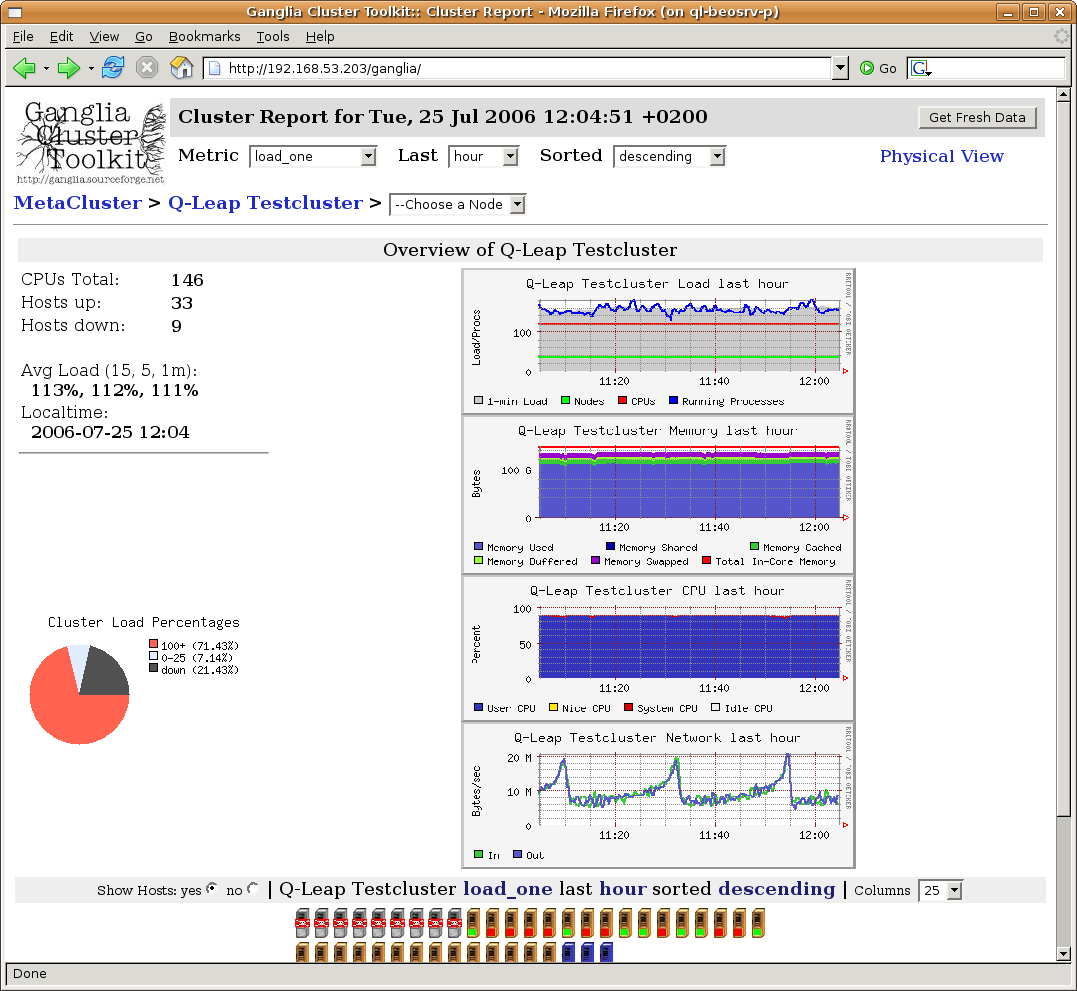
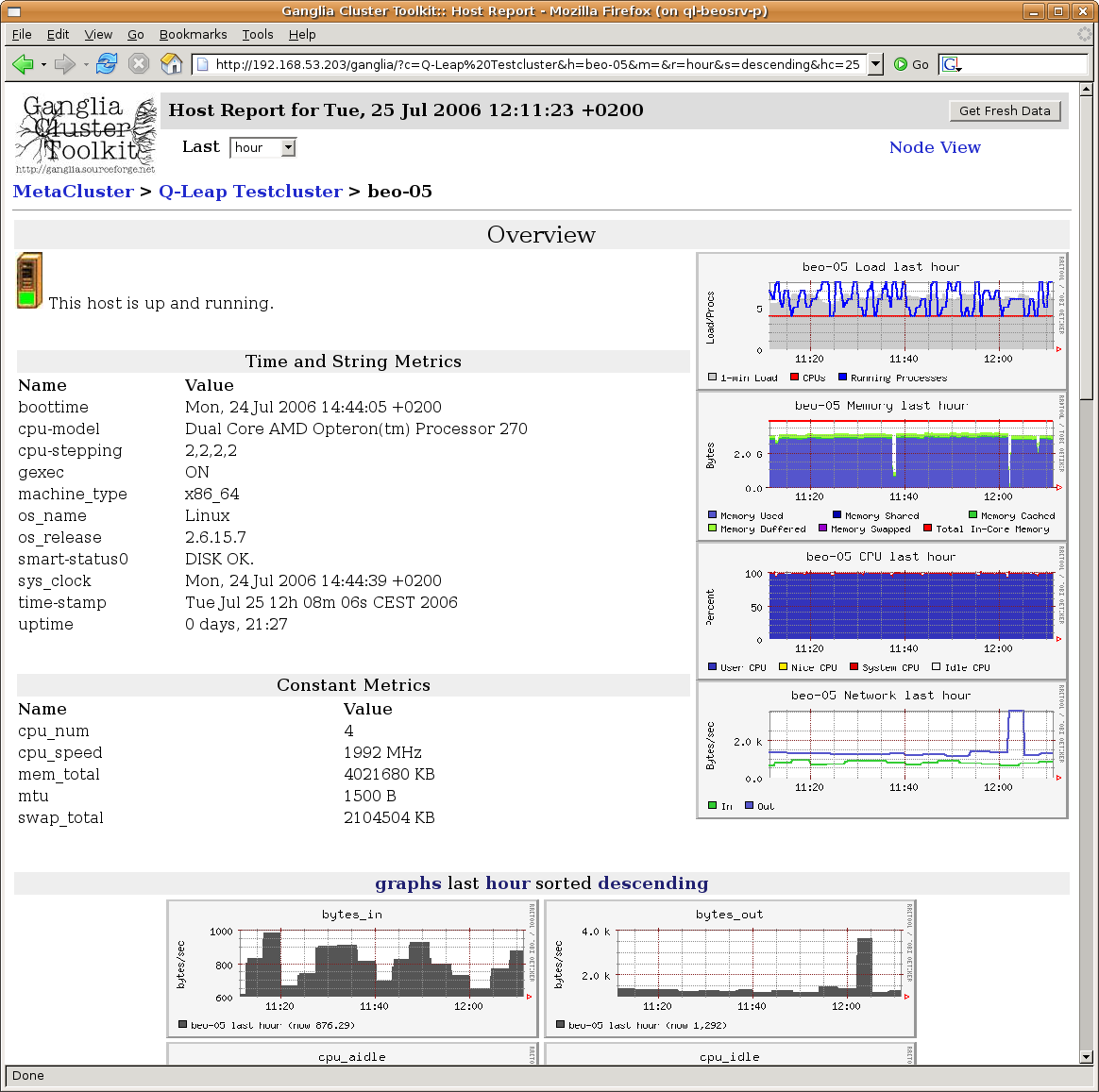
ganglia --help. The package ganglia-webfrontend allows to view the state of your cluster and each node from within a web-browser. It suffices to visit the Link http://<head-node>/ganglia.
/etc/nagios3/conf.d/qlustar. The file nodes.cfg lists the nodes. This file is auto-generated from QluMan. A few lines are required for each node as shown in this example:
define host {
  host_name      beo-01
  use            generic-node
  register       1
}
define host {
  host_name      beo-10
  use            generic-node
  register       1
}
hostgroup-definitions.cfg defines which nodes belong to which hostgroup:
define hostgroup {
  hostgroup_name        ganglia-nodes
  members               beo-0.
  register              1
}
beo-0. specifies, that all nodes with a hostname matching the expression are member of this group. If you need to create additional groups because you have different types of nodes with a different set of available metrics, or with metrics that require different thresholds, then you can define them here. Example:
define hostgroup {
  hostgroup_name          opterons
  members                 beo-1[3-6]
  register                1
}
services.cfg lists all metrics that should be monitored. It includes the thresholds, and for which groups each service is defined. For cluster nodes, the metric data is delivered via Ganglia. The following example defines the monitoring of the fan speed for the members of the group opterons:
define service {
  use                      generic-service
  hostgroup_name           opterons
  service_description      Ganglia fan1
  check_command            check_ganglia_fan!3000!0!"fan1"!$HOSTNAME$
  register                 1
}
warning state once the fan-speed goes below 3000, and if it completely fails (speed 0), it will enter the error state.
define service {
  use                     generic-service
  hostgroup_name          ganglia-nodes,opterons
  service_description     Ganglia temp1
  check_command           check_ganglia_temp!50!60!"temperature1"!$HOSTNAME$
  register                1
}
localhost.cfg lists the services that should be monitored for the head-node(s). The definitions are different because the data is not collected through Ganglia.
Note
http://<head-node>/nagios3/. Login as nagiosadmin. The password can be changed by executing the following command as root:
0 root@cl-head ~ #htpasswd /etc/nagios3/htpasswd.users nagiosadmin
0 root@cl-head ~ #service nagios3 stop
0 root@cl-head ~ #service ganglia-monitor restart0 root@cl-head ~ #service gmetad restart
0 root@cl-head ~ #dsh -a service ganglia-monitor restart0 root@cl-head ~ #dsh -a service gmetric stop0 root@cl-head ~ #dsh -a service gmetric start
0 root@cl-head ~ #service nagios3 start
/usr/sbin/adduser.sh.. Example:
0 root@cl-head ~ #/usr/sbin/adduser.sh -u username -n 'real name'
-h flag. It reads the configuration file /etc/qlustar/common/adduser.cf for default values.
Note
/usr/sbin/removeuser.sh to remove a user account from the system. Example:
To recursively remove the user’s home-directory as well add the0 root@cl-head ~ #removeuser.sh username
-r option:
0 root@cl-head ~ #removeuser.sh -r username
/etc/qlustar/common/skel/envVISUAL to vi:
VISUAL vi
Note
~/.ql-env in a user’s home directory can define personal environment variables in the same manner.
/etc/qlustar/common/skel/aliasenv described above. Again, a personal ~/.ql-alias file can define personal aliases.
/etc/qlustar/common/skel/paths.Linux. The varname is converted to upper case and specifies a ‘PATH like’ environment variable (e.g. PATH, MANPATH, LD_LIBRARY_PATH, CLASSPATH , … ). Each line in this file is a directory to add to this environment variable. If the line begins with a ’p’ followed by a space followed by a directory, then this directory is prepended to the path variable otherwise it is appended. A user can create his/her own ~/.paths directory and so can use the same mechanism.
/etc/qlustar/common/skel. User settings are stored in files in the corresponding home directory.
/etc/qlustar/common/skel/bash/bashrc/etc/qlustar/common/skel/bash/bash-vars/etc/qlustar/common/skel/bash/alias/etc/qlustar/common/skel/bash/functions~/.bashrc also sources the following user specific files which have the same meaning as the global bash files.
~/.bash/env
~/.bash/bash-vars
~/.bash/alias
~/.bash/functions
/etc/qlustar/common/skel/tcsh/tcshrc/etc/qlustar/common/skel/tcsh/tcsh-vars/etc/qlustar/common/skel/tcsh/alias~/.tcshrc also sources the following use specific files which have the same meaning as the global tcsh files.
~/.tcsh/alias
~/.tcsh/env
~/.tcsh/tcsh-vars
mdadm command. It is used to manage the RAID devices (see man page). Status information is obtained form /proc/mdstat.
mdadm to remove the failed disk from the raid-array, and after replacing the disk, first partition it as the old one, then again use mdadm to include the new disk into the raid-array. A failed disk is marked with a (F) in /proc/mdstat.
So disk0 root@cl-head ~ #cat /proc/mdstatPersonalities : [raid0] [raid1] [raid5] [multipath] read_ahead 1024 sectors md0 : active raid1 sdb1[1] sda1[0] 104320 blocks [2/2] [UU] md1 : active raid1 sdb2[0](F) sda2[1] 17414336 blocks [2/1] [_U] md2 : active raid1 sdb3[1] sda3[0] 18322048 blocks [2/2] [UU] unused devices: <none>
/dev/sdb has failed. In the example, the disk error affected only /dev/md1, but partitions of the faulty disk are also part of /dev/md0 and /dev/md2. So they need to be removed as well before the disk can be replaced. Hence, the following commands need to be executed:
To mark the other affected partitions on the disk as faulty and remove them:0 root@cl-head ~ #mdadm --manage /dev/md1 -r /dev/sdb2
Now the disk is not accessed any more and can be removed. After the new disk has been inserted, partition it like the other disk(s) using0 root@cl-head ~ #mdadm --manage /dev/md0 -f /dev/sdb10 root@cl-head ~ #mdadm --manage /dev/md0 -r /dev/sdb10 root@cl-head ~ #mdadm --manage /dev/md2 -f /dev/sdb30 root@cl-head ~ #mdadm --manage /dev/md2 -r /dev/sdb3
parted and then start the resync:
To watch the resync process, you can enter:0 root@cl-head ~ #mdadm --manage /dev/md0 -a /dev/sdb10 root@cl-head ~ #mdadm --manage /dev/md1 -a /dev/sdb20 root@cl-head ~ #mdadm --manage /dev/md2 -a /dev/sdb3
Press Ctrl+C to exit the display.0 root@cl-head ~ #watch --differences=cumulative cat /proc/mdstat
Note
grub-install-uefi-raid for that. On systems running under legacy BIOS mode, you will have to run the command dpkg-reconfigure grub-pc and make sure the new disk is selected when prompted for the GRUB install locations (leave all other options as is).
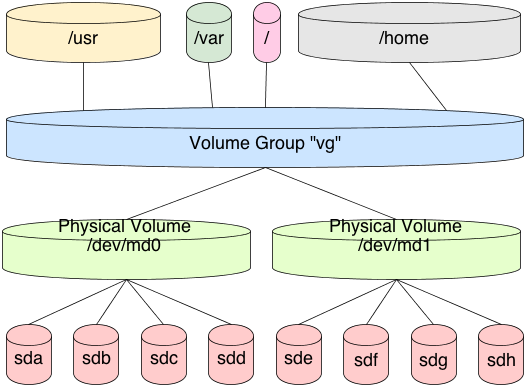
physical volumes, and are then assigned to volume groups. Volume groups contain one or more logical volume, which can be resized according to the storage space available in the volume group. New physical volumes can be added to or removed from a volume group at any time, thereby transparently enlarging or reducing the storage space available in a volume group. Filesystems are created on top of logical volumes.
These commands declare0 root@cl-head ~ #pvcreate /dev/sdb10 root@cl-head ~ #vgcreate vg0 /dev/sdb10 root@cl-head ~ #lvcreate -n scratch -L 1GB vg0
/dev/sdb1 as a physical volume, create the volume group vg0 with the physical volume /dev/sdb1, and create a logical volume /dev/vg0/scratch of size 1GB. You can now create a filesystem on this logical volume and mount it:
To increase the size of the filesystem, you do not have to unmount it, but you have to increase the logical volume before resizing the filesystem:0 root@cl-head ~ #mkfs.ext4 /dev/vg0/scratch0 root@cl-head ~ #mount /dev/vg0/scratch /scratch
This increased the filesystem by 1 GB. If you want to decrease the size of the filesystem, you first need to unmount it. After that, decrease the filesystem and finally reduce the logical volume:0 root@cl-head ~ #lvextend -L +1G /dev/vg0/scratch0 root@cl-head ~ #resize2fs /dev/vg0/scratch
This decreased the filesystem to 500Mb. To check how much space is left in a volume group, use the command0 root@cl-head ~ #unmount /scratch0 root@cl-head ~ #e2fsck -f /dev/vg0/scratch0 root@cl-head ~ #resize2fs /dev/vg0/scratch 500M0 root@cl-head ~ #lvreduce -L 500M /dev/vg0/scratch0 root@cl-head ~ #mount /dev/vg0/scratch /scratch
vgdisplay. Look for a line showing Free Size.
pvcreate
vgscan, vgchange, vgdisplay, vgcreate, vgremove
lvdisplay,lvcreate, lvextend, lvreduce, lvremove
Note
/dev/md0 device that represents a RAID-5 array of 4 disks. In this case, /dev/md0 would be your VDEV.
Note
/dev/sd[c-f]. If you follow the commands on your machine, make sure you execute the following cleanup step, that destroys the created zpool, at the end of each example:
0 root@cl-head ~ #zpool destroy data
data with 4 drives:
In this case, I’m using four disk VDEVs. Because VDEVs are always dynamically striped, effectively we now have a RAID-0 between four drives (no redundancy). We should also check the status of the zpool:0 root@cl-head ~ #zpool create data /dev/sd[c-f]
0 root@cl-head ~ #zpool status datapool: data state: ONLINE scan: none requested config: NAME STATE READ WRITE CKSUM data ONLINE 0 0 0 sdc ONLINE 0 0 0 sdd ONLINE 0 0 0 sde ONLINE 0 0 0 sdf ONLINE 0 0 0 errors: No known data errors
mirror:
0 root@cl-head ~ #zpool create data mirror /dev/sd[c-f]0 root@cl-head ~ #zpool status datapool: data state: ONLINE scan: none requested config: NAME STATE READ WRITE CKSUM data ONLINE 0 0 0 mirror-0 ONLINE 0 0 0 sdc ONLINE 0 0 0 sdd ONLINE 0 0 0 sde ONLINE 0 0 0 sdf ONLINE 0 0 0 errors: No known data errors
mirror-0 is the VDEV, with each physical device managed by it. As mentioned earlier, this would be analogous to a Linux software RAID /dev/md0 device representing the four physical devices. Destroy the pool again before starting the next example.
RAID-10). This is a stripe of mirrors. In order to specify the nested VDEVs, just put them on the command line in order:
The first VDEV is0 root@cl-head ~ #zpool create data mirror /dev/sd[cd] mirror /dev/sd[ef]0 root@cl-head ~ #zpool status datapool: data state: ONLINE scan: none requested config: NAME STATE READ WRITE CKSUM data ONLINE 0 0 0 mirror-0 ONLINE 0 0 0 sdc ONLINE 0 0 0 sdd ONLINE 0 0 0 mirror-1 ONLINE 0 0 0 sde ONLINE 0 0 0 sdf ONLINE 0 0 0 errors: No known data errors
mirror-0 which is managing /dev/sd[cd], the second VDEV is mirror-1 managing /dev/sd[ef]. Since VDEVs are always dynamically striped, mirror-0 and mirror-1 are also striped, thus creating the RAID-10 setup. Don’t forget to cleanup before continuing.
Note
In this case, we created a RAID-0. We used pre-allocated files using0 root@cl-head ~ #for i in {1..4}; do dd if=/dev/zero of=/tmp/file$i bs=1M count=64 \ &> /dev/null; done0 root@cl-head ~ #zpool create data /tmp/file[1-4]0 root@cl-head ~ #zpool status datapool: data state: ONLINE scan: none requested config: NAME STATE READ WRITE CKSUM data ONLINE 0 0 0 /tmp/file1 ONLINE 0 0 0 /tmp/file2 ONLINE 0 0 0 /tmp/file3 ONLINE 0 0 0 /tmp/file4 ONLINE 0 0 0 errors: No known data errors
/dev/zero that are each 64MB (the minimum for a VDEV) in size. Thus, the size of our zpool is 256 MB in usable space. Each file, as with our first example using disks, is a VDEV. Of course, you can treat the files as disks, and put them into a mirror configuration, RAID-10, RAIDZ-1, etc.
First, we created a RAID-10 using our four pre-allocated image files. Notice the VDEVs0 root@cl-head ~ #zpool create data mirror /tmp/file[12] mirror /tmp/file[34] \ log mirror /dev/sd[cd] cache /dev/sd[ef]0 root@cl-head ~ #zpool status datapool: data state: ONLINE scan: none requested config: NAME STATE READ WRITE CKSUM data ONLINE 0 0 0 mirror-0 ONLINE 0 0 0 /tmp/file1 ONLINE 0 0 0 /tmp/file2 ONLINE 0 0 0 mirror-1 ONLINE 0 0 0 /tmp/file3 ONLINE 0 0 0 /tmp/file4 ONLINE 0 0 0 logs mirror-2 ONLINE 0 0 0 sdc ONLINE 0 0 0 sdd ONLINE 0 0 0 cache sde ONLINE 0 0 0 sdf ONLINE 0 0 0 errors: No known data errors
mirror-0/1, and what they are managing. Second, we created a third VDEV called mirror-2 that actually is not used for storing data in the pool, but is used as a ZFS intent log (ZIL). Finally we created two standard disk VDEVs for caching data (sde/f) that are also managed by the cache VDEV. Hence, in this example, we’ve used 6 of the 7 VDEV types listed above, the only one missing is spare. Since neither the logs nor the cache are long-term storage for the pool, we've created a hybrid pool.
Note
Note
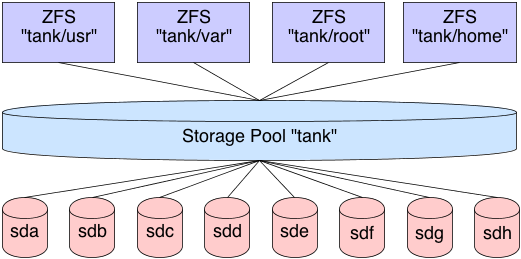
With ZFS, this was done with one command (apart from the analogous of creating the logical volume, which will get to later), rather than seven.0 root@cl-head ~ #mdadm -C /dev/md0 -l 0 -n 4 /dev/sd[c-f]0 root@cl-head ~ #pvcreate /dev/md00 root@cl-head ~ #vgcreate /dev/md0 data0 root@cl-head ~ #lvcreate -l 100%FREE -n home data0 root@cl-head ~ #mkfs.ext4 /dev/data/home0 root@cl-head ~ #mkdir -p /data/home0 root@cl-head ~ #mount -t ext4 /dev/data/home /data/home
Note
/dev/sd[c-g] (each 10TB) in the following examples.
RAIDZ-1 is similar to RAID-5 in that there is a single parity bit distributed across all the disks in the array. The stripe width is variable, and could cover the exact width of disks in the array, fewer disks, or more disks. This still allows for one disk failure to maintain data. Two disk failures results in data loss. A minimum of 3 disks must be used in a RAIDZ-1. The capacity of your storage will be the number of disks in your array times the storage of the smallest disk, minus one disk for parity storage. So in the following example, I should have roughly 20 TB of usable disk space.
raidz1 VDEV, in this case using only 3 disk drives:
Cleanup before moving on.0 root@cl-head ~ #zpool create data raidz1 /dev/sd[c-e]0 root@cl-head ~ #zpool status datapool: data state: ONLINE scan: none requested config: NAME STATE READ WRITE CKSUM data ONLINE 0 0 0 raidz1-0 ONLINE 0 0 0 sdc ONLINE 0 0 0 sdd ONLINE 0 0 0 sde ONLINE 0 0 0 errors: No known data errors
raidz2 VDEV:
Cleanup again before moving on.0 root@cl-head ~ #zpool create data raidz2 /dev/sd[c-f]0 root@cl-head ~ #zpool status datapool: data state: ONLINE scan: none requested config: NAME STATE READ WRITE CKSUM data ONLINE 0 0 0 raidz2-0 ONLINE 0 0 0 sdc ONLINE 0 0 0 sdd ONLINE 0 0 0 sde ONLINE 0 0 0 sdf ONLINE 0 0 0 errors: No known data errors
raidz3 VDEV:
Cleanup again before moving on.0 root@cl-head ~ #zpool create data raidz3 /dev/sd[c-g]0 root@cl-head ~ #zpool status datapool: data state: ONLINE scan: none requested config: NAME STATE READ WRITE CKSUM data ONLINE 0 0 0 raidz3-0 ONLINE 0 0 0 sdc ONLINE 0 0 0 sdd ONLINE 0 0 0 sde ONLINE 0 0 0 sdf ONLINE 0 0 0 sdg ONLINE 0 0 0 errors: No known data errors
0 root@cl-head ~ #
zpool export data
-f switch if needed to force the export.
0 root@cl-head ~ #
zpool import data
0 root@cl-head ~ #
zpool status data
state: ONLINE
scan: none requested
config:
NAME STATE READ WRITE CKSUM
data ONLINE 0 0 0
mirror-0 ONLINE 0 0 0
sde ONLINE 0 0 0
sdf ONLINE 0 0 0
mirror-1 ONLINE 0 0 0
sdg ONLINE 0 0 0
sdh ONLINE 0 0 0
mirror-2 ONLINE 0 0 0
sdi ONLINE 0 0 0
sdj ONLINE 0 0 0
errors: No known data errors
-a switch for importing all discovered pools. For importing the two pools “data1″ and “data2″, type:
0 root@cl-head ~ #
zpool import data1 data2
0 root@cl-head ~ #
zpool import -a
-D switch to tell ZFS to import a destroyed pool. Do not provide the pool name as an argument, as you would normally do:
(server A)
0 root@cl-head ~ #
zpool destroy data
(server B)
0 root@cl-head ~ #
zpool import -D
pool: data
id: 17105118590326096187
state: ONLINE (DESTROYED)
action: The pool can be imported using its name or numeric identifier.
config:
data ONLINE
mirror-0 ONLINE
sde ONLINE
sdf ONLINE
mirror-1 ONLINE
sdg ONLINE
sdh ONLINE
mirror-2 ONLINE
sdi ONLINE
sdj ONLINE
pool: data
id: 2911384395464928396
state: UNAVAIL (DESTROYED)
status: One or more devices are missing from the system.
action: The pool cannot be imported. Attach the missing
devices and try again.
see: http://zfsonlinux.org/msg/ZFS-8000-6X
config:
data UNAVAIL missing device
sdk ONLINE
sdr ONLINE
Additional devices are known to be part of this pool, though their
exact configuration cannot be determined.
df command, you will find that the storage pool is not mounted. This means the ZFS filesystem datasets are not available, and you currently cannot store data into the pool. However, ZFS has found the pool, and you can bring it fully ONLINE for standard usage by running the import command one more time, this time specifying the pool name as an argument to import:
      (server B)
      0 root@cl-head ~ #
      zpool import -D data

      cannot import 'data': more than one matching pool
      import by numeric ID instead

      (server B)
      0 root@cl-head ~ #
      zpool import -D 17105118590326096187

      (server B)
      0 root@cl-head ~ #
      zpool status data

      pool: data
      state: ONLINE
      scan: none requested
      config:

      NAME        STATE     READ WRITE CKSUM
      data        ONLINE       0     0     0
      mirror-0  ONLINE       0     0     0
      sde     ONLINE       0     0     0
      sdf     ONLINE       0     0     0
      mirror-1  ONLINE       0     0     0
      sdg     ONLINE       0     0     0
      sdh     ONLINE       0     0     0
      mirror-2  ONLINE       0     0     0
      sdi     ONLINE       0     0     0
      sdj     ONLINE       0     0     0

      errors: No known data errors
      0 root@cl-head ~ #
      zpool status data

      pool: data
      state: ONLINE
      status: The pool is formatted using an older on-disk format.  The pool can
      still be used, but some features are unavailable.
      action: Upgrade the pool using 'zpool upgrade'.  Once this is done, the
      pool will no longer be accessible on older software versions.
      scrub: none requested
      config:

      NAME        STATE     READ WRITE CKSUM
      data        ONLINE       0     0     0
      mirror-0  ONLINE       0     0     0
      sde     ONLINE       0     0     0
      sdf     ONLINE       0     0     0
      mirror-1  ONLINE       0     0     0
      sdg     ONLINE       0     0     0
      sdh     ONLINE       0     0     0
      mirror-2  ONLINE       0     0     0
      sdi     ONLINE       0     0     0
      sdj     ONLINE       0     0     0
Warning
      0 root@cl-head ~ #
      zpool upgrade -v

      This system is currently running ZFS pool version 28.
      The following versions are supported:

      VER   DESCRIPTION
      ---   ---------------------------------------------------
      1    Initial ZFS version
      2    Ditto blocks (replicated meta-data)
      3    Hot spares and double parity RAID-Z
      4    zpool history
      5    Compression using the gzip algorithm
      6    bootfs pool property
      7    Separate intent log devices
      8    Delegated administration
      9    refquota and refreservation properties
      10   Cache devices
      11   Improved scrub performance
      12   Snapshot properties
      13   snapused property
      14   passthrough-x aclinherit
      15   user/group space accounting
      16   stmf property support
      17   Triple-parity RAID-Z
      18   Snapshot user holds
      19   Log device removal
      20   Compression using zle (zero-length encoding)
      21   Deduplication
      22   Received properties
      23   Slim ZIL
      24   System attributes
      25   Improved scrub stats
      26   Improved snapshot deletion performance
      27   Improved snapshot creation performance
      28   Multiple vdev replacements

      For more information on a particular version, including supported releases,
      see the ZFS Administration Guide.
      0 root@cl-head ~ #
      zpool upgrade -a
zpool command has enough sub-commands and switches to handle the most common scenarios when a pool will not export or import. Towards the very end of the series, we’ll discuss the zdb command, and how it may be useful here. But at this point, steer clear of zdb, and just focus on keeping your pools in order, and properly exporting and importing them as needed.
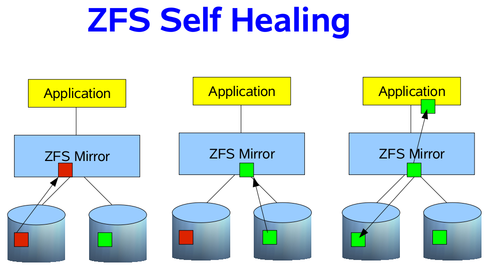
umount command to unmount your disks, before the fsck. For root partitions, this further means booting from another medium, like a CDROM or USB stick. Depending on the size of the disks, this downtime could take hours. Second, the filesystem, such as ext3 or ext4, knows nothing of the underlying data structures, such as LVM or RAID. You may only have a bad block on one disk, but a good block on another disk. Unfortunately, Linux software RAID has no idea which is good or bad, and from the perspective of ext3 or ext4, it will get good data if read from the disk containing the good block, and corrupted data from the disk containing the bad block, without any control over which disk to pull the data from, and fixing the corruption. These errors are known as silent data errors, and there is really nothing you can do about it with the standard GNU/Linux filesystem stack.
      0 root@cl-head ~ #
      zpool scrub data

      0 root@cl-head ~ #
      zpool status data

      pool: data
      state: ONLINE
      scan: scrub in progress since Sat Dec  8 08:06:36 2012
      32.0M scanned out of 48.5M at 16.0M/s, 0h0m to go
      0 repaired, 65.99% done
      config:

      NAME        STATE     READ WRITE CKSUM
      data        ONLINE       0     0     0
      mirror-0  ONLINE       0     0     0
      sde     ONLINE       0     0     0
      sdf     ONLINE       0     0     0
      mirror-1  ONLINE       0     0     0
      sdg     ONLINE       0     0     0
      sdh     ONLINE       0     0     0
      mirror-2  ONLINE       0     0     0
      sdi     ONLINE       0     0     0
      sdj     ONLINE       0     0     0

      errors: No known data errors
-s switch to the scrub sub-command. However, you should let the scrub continue to completion.
      0 root@cl-head ~ #
      zpool scrub -s data
0 2 * * 0 /sbin/zpool scrub data
      0 root@cl-head ~ #
      for i in a b c d e f g; do echo -n "/dev/sd$i: "; hdparm -I
      /dev/sd$i | awk '/Serial Number/ {print $3}'; done

      /dev/sda: OCZ-9724MG8BII8G3255
      /dev/sdb: OCZ-69ZO5475MT43KNTU
      /dev/sdc: WD-WCAPD3307153
      /dev/sdd: JP2940HD0K9RJC
      /dev/sde: /dev/sde: No such file or directory
      /dev/sdf: JP2940HD0SB8RC
      /dev/sdg: S1D1C3WR
/dev/sde is my dead disk. I have the serial numbers for all the other disks in the system, but not this one. So, by process of elimination, I can go to the storage array, and find which serial number was not printed. This is my dead disk. In this case, I find serial number “JP2940HD01VLMC”. I pull the disk, replace it with a new one, and see if /dev/sde is repopulated, and the others are still online. If so, I’ve found my disk, and can add it to the pool. This has actually happened to me twice already, on both of my personal hyper-visors. It was a snap to replace, and I was online in under 10 minutes.
replace sub-command. Suppose the new disk also identified itself as /dev/sde, then I would issue the following command:
      0 root@cl-head ~ #
      zpool replace data sde sde

      0 root@cl-head ~ #
      zpool status data

      pool: data
      state: ONLINE
      status: One or more devices is currently being resilvered.  The pool will
      continue to function, possibly in a degraded state.
      action: Wait for the resilver to complete.
      scrub: resilver in progress for 0h2m, 16.43% done, 0h13m to go
      config:

      NAME          STATE       READ WRITE CKSUM
      data          DEGRADED       0     0     0
      mirror-0    DEGRADED       0     0     0
      replacing DEGRADED       0     0     0
      sde       ONLINE         0     0     0
      sdf       ONLINE         0     0     0
      mirror-1    ONLINE         0     0     0
      sdg       ONLINE         0     0     0
      sdh       ONLINE         0     0     0
      mirror-2    ONLINE         0     0     0
      sdi       ONLINE         0     0     0
      sdj       ONLINE         0     0     0
zpool status command can be done by passing the -x switch. This is useful for scripts to parse without fancy logic, which could alert you in the event of a failure:
      0 root@cl-head ~ #
      zpool status -x

      all pools are healthy
zpool status command give you vital information about the pool, most of which are self-explanatory. They are defined as follows:
zpool replace command. This setting is a boolean, with values either “on” or “off”.
/etc/zfs/zpool.cache should be sufficient.
zpool online -e). This space occurs when a LUN is dynamically expanded.
zfs list command. If this property is disabled, snapshot information can be displayed with the zfs list -t snapshot command. The default value is “off”. Boolean value that can be either “off” or “on”.
zpool upgrade -v command. This property can be used when a specific version is needed for backwards compatibility.
      0 root@cl-head ~ #
      zpool get health data

      NAME  PROPERTY  VALUE   SOURCE
      data  health    ONLINE  -
      0 root@cl-head ~ #
      zpool get health,free,allocated data

      NAME  PROPERTY   VALUE   SOURCE
      data  health     ONLINE  -
      data  free       176G    -
      data  allocated  32.2G   -
      0 root@cl-head ~ #
      zpool get all data

      NAME  PROPERTY       VALUE       SOURCE
      data  size           208G        -
      data  capacity       15%         -
      data  altroot        -           default
      data  health         ONLINE      -
      data  guid           1695112377970346970  default
      data  version        28          default
      data  bootfs         -           default
      data  delegation     on          default
      data  autoreplace    off         default
      data  cachefile      -           default
      data  failmode       wait        default
      data  listsnapshots  off         default
      data  autoexpand     off         default
      data  dedupditto     0           default
      data  dedupratio     1.00x       -
      data  free           176G        -
      data  allocated      32.2G       -
      data  readonly       off         -
      data  ashift         0           default
      data  comment        -           default
      data  expandsize     0           -
      0 root@cl-head ~ #
      zpool set comment="Contact admins@example.com" data

      0 root@cl-head ~ #
      zpool get comment data

      NAME  PROPERTY  VALUE                       SOURCE
      data  comment   Contact admins@example.com  local
-o switch, as follows:
      0 root@cl-head ~ #
      zpool create -o ashift=12 data raid1 sda sdb
zpool, and easy-to-recall sub-commands. We’ll have one more post discussing a thorough examination of caveats that you will want to consider before creating your pools, then we will leave the zpool category, and work our way towards ZFS datasets, the bread and butter of ZFS as a whole. If there is anything additional about zpools you would like me to post on, let me know now, and I can squeeze it in.
      0 root@cl-head ~ #
      zfs create data/test

      0 root@cl-head ~ #
      zfs list

      NAME         USED  AVAIL  REFER  MOUNTPOINT
      data         175K  2.92G  43.4K  /data
      data/test   41.9K  2.92G  41.9K  /data/test
      0 root@cl-head ~ #
      zfs create data/test2

      0 root@cl-head ~ #
      zfs create data/test3

      0 root@cl-head ~ #
      zfs create data/test4

      0 root@cl-head ~ #
      zfs create data/test5

      0 root@cl-head ~ #
      zfs list

      NAME         USED  AVAIL  REFER  MOUNTPOINT
      data         392K  2.92G  47.9K  /data
      data/test   41.9K  2.92G  41.9K  /data/test
      data/test2  41.9K  2.92G  41.9K  /data/test2
      data/test3  41.9K  2.92G  41.9K  /data/test3
      data/test4  41.9K  2.92G  41.9K  /data/test4
      data/test5  41.9K  2.92G  41.9K  /data/test5
      0 root@cl-head ~ #
      cd /data/test3

      0 root@cl-head ~ #
      for i in {1..10}; do dd if=/dev/urandom of=file$i.img bs=1024 count=$RANDOM
      &> /dev/null; done

      0 root@cl-head ~ #
      zfs list

      NAME         USED  AVAIL  REFER  MOUNTPOINT
      data         159M  2.77G  49.4K  /data
      data/test   41.9K  2.77G  41.9K  /data/test
      data/test2  41.9K  2.77G  41.9K  /data/test2
      data/test3   158M  2.77G   158M  /data/test3
      data/test4  41.9K  2.77G  41.9K  /data/test4
      data/test5  41.9K  2.77G  41.9K  /data/test5
      0 root@cl-head ~ #
      umount /data/test5

      0 root@cl-head ~ #
      mount | grep data

      data/test on /data/test type zfs (rw,relatime,xattr)
      data/test2 on /data/test2 type zfs (rw,relatime,xattr)
      data/test3 on /data/test3 type zfs (rw,relatime,xattr)
      data/test4 on /data/test4 type zfs (rw,relatime,xattr)
      0 root@cl-head ~ #
      zfs mount data/test5

      0 root@cl-head ~ #
      mount | grep data

      data/test on /data/test type zfs (rw,relatime,xattr)
      data/test2 on /data/test2 type zfs (rw,relatime,xattr)
      data/test3 on /data/test3 type zfs (rw,relatime,xattr)
      data/test4 on /data/test4 type zfs (rw,relatime,xattr)
      data/test5 on /data/test5 type zfs (rw,relatime,xattr)
      0 root@cl-head ~ #
      zfs set mountpoint=/mnt/test data/test

      0 root@cl-head ~ #
      mount | grep data

      data on /data type zfs (rw,relatime,xattr)
      data/test2 on /data/test2 type zfs (rw,relatime,xattr)
      data/test3 on /data/test3 type zfs (rw,relatime,xattr)
      data/test4 on /data/test4 type zfs (rw,relatime,xattr)
      data/test5 on /data/test5 type zfs (rw,relatime,xattr)
      data/test on /mnt/test type zfs (rw,relatime,xattr)
      0 root@cl-head ~ #
      zfs create data/test/log

      0 root@cl-head ~ #
      zfs list

      NAME            USED  AVAIL  REFER  MOUNTPOINT
      data            159M  2.77G  47.9K  /data
      data/test      85.3K  2.77G  43.4K  /mnt/test
      data/test/log  41.9K  2.77G  41.9K  /mnt/test/log
      data/test2     41.9K  2.77G  41.9K  /data/test2
      data/test3      158M  2.77G   158M  /data/test3
      data/test4     41.9K  2.77G  41.9K  /data/test4
      data/test5     41.9K  2.77G  41.9K  /data/test5
      0 root@cl-head ~ #
      zfs destroy data/test5

      0 root@cl-head ~ #
      zfs list

      NAME            USED  AVAIL  REFER  MOUNTPOINT
      data            159M  2.77G  49.4K  /data
      data/test      41.9K  2.77G  41.9K  /mnt/test
      data/test/log  41.9K  2.77G  41.9K  /mnt/test/log
      data/test2     41.9K  2.77G  41.9K  /data/test2
      data/test3      158M  2.77G   158M  /data/test3
      data/test4     41.9K  2.77G  41.9K  /data/test4
      0 root@cl-head ~ #
      zfs rename data/test3 data/music

      0 root@cl-head ~ #
      zfs list

      NAME            USED  AVAIL  REFER  MOUNTPOINT
      data            159M  2.77G  49.4K  /data
      data/music      158M  2.77G   158M  /data/music
      data/test      41.9K  2.77G  41.9K  /mnt/test
      data/test/log  41.9K  2.77G  41.9K  /mnt/test/log
      data/test2     41.9K  2.77G  41.9K  /data/test2
      data/test4     41.9K  2.77G  41.9K  /data/test4
Warning
      0 root@cl-head ~ #
      zfs create data/log

      0 root@cl-head ~ #
      zfs set compression=lzjb data/log
      0 root@cl-head ~ #
      tar -cf /data/test/text.tar /var/log/ /etc/

      0 root@cl-head ~ #
      ls -lh /data/test/text.tar

      -rw-rw-r-- 1 root root 24M Dec 17 21:24 /data/test/text.tar

      0 root@cl-head ~ #
      zfs list data/test

      NAME        USED  AVAIL  REFER  MOUNTPOINT
      data/test  11.1M  2.91G  11.1M  /data/test

      0 root@cl-head ~ #
      zfs get compressratio data/test

      NAME       PROPERTY       VALUE  SOURCE
      data/test  compressratio  2.14x  -
      - pool/dataset@snapshot-name
      - pool@snapshot-name
      0 root@cl-head ~ #
      zfs snapshot data/test@tuesday
      0 root@cl-head ~ #
      zfs set compression=lzjb data/test@friday

      cannot set property for 'data/test@friday': this property can not be modified for
      snapshots
      0 root@cl-head ~ #
      ls -a /data/test

      ./  ../  boot.tar  text.tar  text.tar.2

      0 root@cl-head ~ #
      cd /data/test/.zfs/

      0 root@cl-head ~ #
      ls -a

      ./  ../  shares/  snapshot/
      0 root@cl-head ~ #
      zfs set snapdir=visible data/test

      0 root@cl-head ~ #
      ls -a /data/test

      ./  ../  boot.tar  text.tar  text.tar.2  .zfs/
      0 root@cl-head ~ #
      zfs list -t snapshot

      NAME                              USED  AVAIL  REFER  MOUNTPOINT
      pool/cache@2012:12:18:51:2:19:00     0      -   525M  -
      pool/cache@2012:12:18:51:2:19:15     0      -   525M  -
      pool/home@2012:12:18:51:2:19:00  18.8M      -  28.6G  -
      pool/home@2012:12:18:51:2:19:15  18.3M      -  28.6G  -
      pool/log@2012:12:18:51:2:19:00    184K      -  10.4M  -
      pool/log@2012:12:18:51:2:19:15    184K      -  10.4M  -
      pool/swap@2012:12:18:51:2:19:00      0      -    76K  -
      pool/swap@2012:12:18:51:2:19:15      0      -    76K  -
      pool/vmsa@2012:12:18:51:2:19:00      0      -  1.12M  -
      pool/vmsa@2012:12:18:51:2:19:15      0      -  1.12M  -
      pool/vmsb@2012:12:18:51:2:19:00      0      -  1.31M  -
      pool/vmsb@2012:12:18:51:2:19:15      0      -  1.31M  -
      data@2012:12:18:51:2:19:00           0      -  43.4K  -
      data@2012:12:18:51:2:19:15           0      -  43.4K  -
      data/test@2012:12:18:51:2:19:00      0      -  37.1M  -
      data/test@2012:12:18:51:2:19:15      0      -  37.1M  -
      0 root@cl-head ~ #
      zfs list -r -t snapshot data

      NAME                              USED  AVAIL  REFER  MOUNTPOINT
      data@2012:12:18:51:2:19:00           0      -  43.4K  -
      data@2012:12:18:51:2:19:15           0      -  43.4K  -
      data/test@2012:12:18:51:2:19:00      0      -  37.1M  -
      data/test@2012:12:18:51:2:19:15      0      -  37.1M  -
      0 root@cl-head ~ #
      zfs destroy data/test@2012:12:18:51:2:19:15
      0 root@cl-head ~ #
      zfs destroy data/test

      cannot destroy 'data/test': filesystem has children
      use '-r' to destroy the following datasets:
      data/test@2012:12:18:51:2:19:15
      data/test@2012:12:18:51:2:19:00
      0 root@cl-head ~ #
      zfs rename data/test@2012:12:18:51:2:19:15 data/test@tuesday-19:15
      0 root@cl-head ~ #
      zfs rollback data/test@tuesday

      cannot rollback to 'data/test@tuesday': more recent snapshots exist
      use '-r' to force deletion of the following snapshots:
      data/test@wednesday
      data/test@thursday
      0 root@cl-head ~ #
      zfs clone data/test@tuesday data/tuesday

      0 root@cl-head ~ #
      dd if=/dev/zero of=/data/tuesday/random.img bs=1M count=100

      0 root@cl-head ~ #
      zfs list -r data

      NAME           USED  AVAIL  REFER  MOUNTPOINT
      data           161M  2.78G  44.9K  /data
      data/test     37.1M  2.78G  37.1M  /data/test
      data/tuesday   124M  2.78G   161M  /data/tuesday
      0 root@cl-head ~ #
      zfs destroy data/tuesday
      0 root@cl-head ~ #
      zfs snapshot data/test@tuesday

      0 root@cl-head ~ #
      zfs send data/test@tuesday > /backup/test-tuesday.img
      0 root@cl-head ~ #
      zfs send data/test@tuesday | xz > /backup/test-tuesday.img.xz
      0 root@cl-head ~ #
      zfs send data/test@tuesday | xz | openssl enc -aes-256-cbc -a
      -salt > /backup/test-tuesday.img.xz.asc
      0 root@cl-head ~ #
      zfs receive data/test2 < /backup/test-tuesday.img
      0 root@cl-head ~ #
      openssl enc -d -aes-256-cbc -a -in /storage/temp/testzone.gz.ssl
      | unxz | zfs receive data/test2
      0 root@cl-head ~ #
      zfs send data/test@tuesday | zfs receive pool/test
      0 root@cl-head ~ #
      zfs send data/test@tuesday | ssh user@server.example.com "zfs receive pool/test"
      0 root@cl-head ~ #
      zfs create -V 1G data/disk1

      0 root@cl-head ~ #
      ls -l /dev/zvol/data/disk1

      lrwxrwxrwx 1 root root 11 Dec 20 22:10 /dev/zvol/data/disk1 -> ../../zd144

      0 root@cl-head ~ #
      ls -l /dev/data/disk1

      lrwxrwxrwx 1 root root 8 Dec 20 22:10 /dev/data/disk1 -> ../zd144
      0 root@cl-head ~ #
      fallocate -l 1G /tmp/file.img

      0 root@cl-head ~ #
      losetup /dev/loop0 /tmp/file.img
      0 root@cl-head ~ #
      free

      total       used       free     shared    buffers     cached
      Mem:      12327288    8637124    3690164          0     175264    1276812
      -/+ buffers/cache:    7185048    5142240
      Swap:            0          0          0
      0 root@cl-head ~ #
      zfs create -V 1G data/swap

      0 root@cl-head ~ #
      mkswap /dev/zvol/data/swap

      0 root@cl-head ~ #
      swapon /dev/zvol/data/swap

      0 root@cl-head ~ #
      free

      total       used       free     shared    buffers     cached
      Mem:      12327288    8667492    3659796          0     175268    1276804
      -/+ buffers/cache:    7215420    5111868
      Swap:      1048572          0    1048572
      0 root@cl-head ~ #
      zfs create -V 100G data/ext4

      0 root@cl-head ~ #
      fdisk /dev/data/ext4

      ( follow the prompts to create 2 partitions- the first 1 GB in size, the second to
      fill the rest )

      0 root@cl-head ~ #
      fdisk -l /dev/data/ext4

      Disk /dev/data/ext4: 107.4 GB, 107374182400 bytes
      16 heads, 63 sectors/track, 208050 cylinders, total 209715200 sectors
      Units = sectors of 1 * 512 = 512 bytes
      Sector size (logical/physical): 512 bytes / 8192 bytes
      I/O size (minimum/optimal): 8192 bytes / 8192 bytes
      Disk identifier: 0x000a0d54


      Device Boot       Start         End      Blocks   Id  System
      /dev/data/ext4p1            2048     2099199     1048576   83  Linux
      /dev/data/ext4p2         2099200   209715199   103808000   83  Linux
      0 root@cl-head ~ #
      zfs set compression=lzjb pool/ext4

      0 root@cl-head ~ #
      tar -cf /mnt/zd0p1/files.tar /etc/

      0 root@cl-head ~ #
      tar -cf /mnt/zd0p2/files.tar /etc /var/log/

      0 root@cl-head ~ #
      zfs snapshot data/ext4@001
      <disk type='block' device='disk'>
      <driver name='qemu' type='raw' cache='none'/'>
      <source dev='/dev/zd0'/'>
      <target dev='vda' bus='virtio'/'>
      <alias name='virtio-disk0'/'>
      <address type='pci' domain='0x0000' bus='0x00' slot='0x05' function='0x0'/'>
      </disk'>
/etc/apt/sources.list (or separate files in the directory /etc/apt/sources.list.d) specifies the location of package sources.
/etc/apt/sources.list and can be of many different types, like http, ftp, file, cdrom, … (see man sources.list). In a default Qlustar installation this file is empty, since all the Qlustar package sources are defined in the file /etc/apt/sources.list.d/qlustar.list. If your system has access to the Internet either directly or through a http proxy the file will look like this:
deb http://repo.qlustar.com/repo/ubuntu 11.0-bionic main universe non-free
deb http://repo.qlustar.com/repo/ubuntu 11.0-bionic-proposed-updates main universe non-free
Note
/etc/apt/sources.list.d/qlustar.list is managed by Qlustar and should usually not be edited manually. If you prefer not to receive the proposed updates, you can comment out the second line in the file. Be aware, that this will prevent you from receiving timely security updates as well.
dpkg (see man dpkg) is the basic package management tool for Ubuntu/Debian, comparable to rpm (Red Hat Package Manager). It is not capable of automatically resolving package dependencies.
apt is the high-level package management tool for Ubuntu/Debian. apt (man apt) with its sub-commands provides all the functionality needed to maintain an Ubuntu/Debian system. A seem-less and fast upgrade of an Ubuntu/Debian system is typically performed running the two commands
0 root@cl-head ~ #apt update0 root@cl-head ~ #apt dist-upgrade.
apt install <package name>. If package name depends on, or conflicts with other packages those will be automatically installed or removed upon confirmation.
gcc as an example of the situation described above. Simply installing the gcc package via apt is all you need to do in this case. The alternatives are automatically configured for you.
This tells us that currently we are running the version 5.4.0 of the GNU C compiler. Let us inspect the cc binary.0 root@cl-head ~ #cc --versioncc (Ubuntu 5.4.0-6ubuntu1~16.04.9) 5.4.0 20160609 Copyright (C) 2015 Free Software Foundation, Inc. This is free software; see the source for copying conditions. There is NO warranty; not even for MERCHANTABILITY or FITNESS FOR A PARTICULAR PURPOSE.
As we tried to locate the0 root@cl-head ~ #type cccc is hashed (/usr/bin/cc)0 root@cl-head ~ #ls -l /usr/bin/cclrwxrwxrwx ... /usr/bin/cc -> /etc/alternatives/cc
cc command, we found that it was being executed from the /usr/bin path. However we also discovered, that it’s a symbolic link pointing to /etc/alternatives/cc. The directory /etc/alternatives is the place, where all the software alternatives are configured in Ubuntu/Debian. Let us inspect a little further.
We have another symbolic link, this time referring to0 root@cl-head ~ #ls -l /etc/alternatives/cclrwxrwxrwx ... /etc/alternatives/cc -> /usr/bin/gcc
/usr/bin/gcc and a little digging afterward reveals that this is a link to the real gcc executable. If alternative versions for a program are available, the alternatives system will create a link with the name of the program in the default path pointing to the appropriate file in /etc/alternatives. This will finally link to the executable, we actually want to use. Instead of manually manipulating these links, choosing a different default version for a program should be done using the command update-alternatives.
update-alternatives we can quickly figure out which alternatives are currently configured for a certain executable. Let us look at the current setup of cc.
As you can see the current link points to0 root@cl-head ~ #update-alternatives --display gcccc - auto mode link best version is /usr/bin/gcc link currently points to /usr/bin/gcc link cc is /usr/bin/cc slave cc.1.gz is /usr/share/man/man1/cc.1.gz /usr/bin/gcc - priority 20 slave cc.1.gz: /usr/share/man/man1/gcc.1.gz
/usr/bin/gcc as we already discovered. There might be another alternative, with a different priority. The line 'gcc - auto mode’ means that the alternatives system will look for the package with the highest priority in order to use that executable.
/usr/bin/gcc. If we had installed an alternative for cc and would want to want to use it instead, we could tell update-alternatives to use this variant as follows:
0 root@cl-head ~ #update-alternatives --config cc
update-alternatives is the possibility of creating groups of files having a relation with each other. These so called slaves will not only allow you to update the link to the desired executable, but also any other information related to it like man pages, documentation, etc. as shown for the cc example above. Please consult man update-alternatives for more information on the capabilities of this powerful software versioning method.
0 root@cl-head ~ #apt update0 root@cl-head ~ #apt dist-upgrade
0 root@cl-head ~ #qlustar-image-update -H <hostlist>
0 root@cl-head ~ #qlustar-image-update -c -H <hostlist>
0 root@cl-head ~ #qlustar-image-update -s -H <hostlist>
| Revision History | |||
|---|---|---|---|
| Revision 11.0-0 | Mon May 27 2019 | ||
| |||
| Revision 10.1-0 | Fri Aug 31 2018 | ||
| |||
| Revision 10.0-0 | Fr Apr 6 2018 | ||
| |||
| Revision 9.2-0 | Thu Apr 27 2017 | ||
| |||
| Revision 9.1-1 | Fri Jul 3 2015 | ||
| |||
| Revision 9.0-1 | Thu Jan 29 2015 | ||
| |||
| Revision 8.1-1 | Wed Jan 15 2014 | ||
| |||
| Revision 8.0-1 | Fri Mar 1 2013 | ||
| |||