Release Notes
1. Basic Info
The Qlustar 14 release is based on Ubuntu 24.04. It includes all security fixes and other package updates published before Apr 26th 2025. Available security updates relevant to Qlustar 14 that have appeared after this date, will be announced on the Qlustar website and in the Qlustar security newsletter. Supported edge-platforms are Ubuntu 24.04 (Noble) and AlmaLinux 8.
2. New features
2.1. State of the Art Qlustar Monitoring
The Qlustar monitoring stack has been reimplemented from the ground up and is now based on Grafana + Prometheus. Both of them are tightly integrated with the other Qlustar components and can be controlled with a powerful new configuration interface of the QluMan GUI.
Customized Grafana dashboards are available to provide a nice interface for the hardware and software components of a Qlustar cluster. As a consequence, we say goodbye to the legacy Ganglia/Nagios based stack which served Qlustar and its users well for many years.
2.2. QluMan 14 with Management of Monitoring Configs
Supplementing the new Grafana/Prometheus monitoring stack a new configuration module has been added to conveniently configure the Prometheus setup including a powerful interface to define alerts for any metric defined for Prometheus.
3. Major component updates/versions
- Kernel 6.12
-
Qlustar 14 is based on the 6.12 LTS kernel series (Ubuntu only) with initial version 6.12.25.
- Slurm
-
Qlustar 14 starts with the HPC Core stack 25.03 (same as current Qlustar 13) which includes the Slurm 24.11 series with the current version being 24.11.3.
- ZFS
-
Qlustar 14 includes the ZFS 2.2.x series with the current version being 2.2.7.
- Nvidia CUDA
-
Qlustar 14 provides optimal support for Nvidia GPU hardware by supplying pre-compiled and up-to-date kernel drivers as well as core libraries of CUDA 12.6.3 needed for integration with other system components. Full CUDA releases should be installed via Spack.
- Lustre
-
Qlustar 14 comes with the most recent Lustre LTS version 2.15.6 providing support for clients and servers with ready-to-use image modules.
- BeeGFS
-
Qlustar 14 has integrated the most recent BeeGFS release 7.4.6 for clients and servers with ready-to-use image modules.
4. Other notable package version updates
Packages part of the Qlustar HPC core stack (25.03):
-
spack: 0.23.1 -
rdma-core: 55.0 -
hwloc: 2.11.2 -
pmix: 5.0.6 -
ucx: 1.18.1
6. Qlustar Cross-Version Compatibility
Cross-version compatibility is provided between Qlustar 13 and 14. In practice this means that on a cluster with a Qlustar 14 head-node, you can still run nodes with Qlustar 13 images/chroots and vice versa. This allows smooth release upgrades: Admins can already run a subset of nodes with the new Qlustar release and do the final migration on the head-node(s) only, once users have successfully migrated their applications to it. After the full upgrade is done, it is still possible to run some nodes with the old release in case some problematic applications require it.
|
Qlustar 14 node images do not support Ganglia anymore, so in a cluster with a Qlustar 13 head-node, you will see Qlustar 14 nodes as being down. |
7. Update instructions
-
Preparations
Upgrading to Qlustar 14 is only supported from the most recent 13 release. Please make sure that you have updated to this release as described in the latest security advisory on the Qlustar website.
Make sure that you have no unwritten changes in the QluMan database. If you do, write them to disk as described in the QluMan Guide before proceeding with the update.
-
Optionally clone chroots
In the QluMan GUI, clone existing Ubuntu 22.04 and AlmaLinux/8 chroots based on 13 and then afterwards upgrade the clones to 14. That allows for easy rollback.
-
Backup important head-node data
The following commands create a backup of the head-node’s
/etcdirectory, the QluMan database and the LDAP directory.0 root@cl-head ~ # cp -a /etc /var/backups/etc-qlustar-13 0 root@cl-head ~ # /usr/share/qlustar/exec/backup-qlustar-db
-
Check for merged /usr
Pre-13 Qlustar installations didn’t have a merged
/usrsetup yet. The next step checks for an unmerged/usrand performs the merge if necessary. Additionally, the new archive key of the Qlustar package repository is installed. This is important to prevent failures during the update to Qlustar 14 in the steps to follow.0 root@cl-head ~ # apt update 0 root@cl-head ~ # apt install qlustar-base 0 root@cl-head ~ # qlustar-pre-13-to-14-update.sh
-
Update to Qlustar 14 package sources list
The Qlustar apt sources list needs to be changed as follows both on the head-node(s) and in all existing Ubuntu based chroot(s) that should be updated.
0 root@cl-head ~ #
apt update
0 root@cl-head ~ #
apt install qlustar-sources-list-14
To prepare an AlmaLinux 8 based chroot for the upgrade, change into it and execute the following (confirm the import of the Q-Leap GPG key
0x3C0BC307):(alma8) 0 root@cl-head ~ # yum update (alma8) 0 root@cl-head ~ # yum install qlustar-14-repos (alma8) 0 root@cl-head ~ # yum remove qlustar-13.0-repos
-
Update head-node packages
On the head-node execute
0 root@cl-head ~ #
apt update
0 root@cl-head ~ #
apt dist-upgrade
When asked about what services to restart during the update, delete all services from the suggested list. This will prevent the update from failing in case some services might not restart immediately. Since a reboot is necessary after this update, the restart during the update is not needed.
When asked about whether you want to update the configuration file for some package, you should answer 'N' (keep the old version) unless you have a specific reason to change it. Similarly choose 'keep the local version currently installed' when a menu for 'Package configuration' appears.
-
Execute post-update script
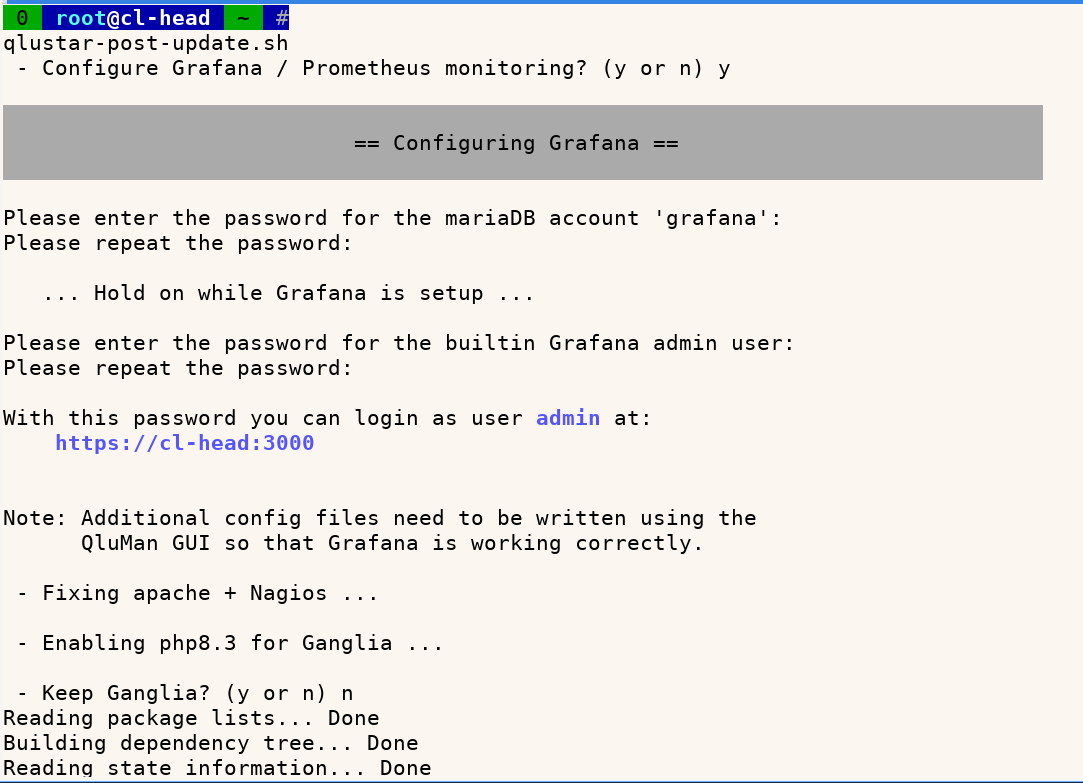 Running the following script will apply some necessary fixes to correct glitches of the
automatic apt update process and offers to setup Prometheus/Grafana as the new monitoring
solution as well as to remove the old monitoring stack based on Ganglia and Nagios.
Running the following script will apply some necessary fixes to correct glitches of the
automatic apt update process and offers to setup Prometheus/Grafana as the new monitoring
solution as well as to remove the old monitoring stack based on Ganglia and Nagios.0 root@cl-head ~ # qlustar-post-update.sh
qlustar-post-update.shcan be rerun at any time if you prefer to migrate to Prometheus/Grafana later or keep Ganglia and Nagios for a little longer. -
Update chroots
Change into each Ubuntu based chroot you want to update (e.g.)
0 root@cl-head ~ #
chroot-jammy
and also execute:
(jammy) 0 root@cl-head ~ #
apt update
(focal) 0 root@cl-head ~ #
apt dist-upgrade
Change into each AlmaLinux 8 based chroot you want to update (e.g.)
0 root@cl-head ~ #
chroot-alma8
and execute (confirm the import of the new Qlustar GPG key):
(alma8) 0 root@cl-head ~ #
yum update
-
Activate Grafana/Prometheus Monitoring
Connect with the QluMan GUI and write the Alert config files.
-
Reboot head-node(s)
Initially only reboot the head-node(s). Do that now.
-
Regenerating Qlustar images
Regenerate your Qlustar images with the 14 image modules. To accomplish this, you have to select flavour noble for Ubuntu based images (the flavours of CentOS/AlmaLinux based images doesn’t change) and Version 14 in the QluMan Qlustar Images dialog. If you have new cloned chroots, select those as well.
If your images include image modules that have a version in their name (e.g. lustre-2.15-server), make sure that you change to the corresponding module with the most recent version (e.g. lustre-2.17-server).
-
Reboot compute- and storage-nodes
8. Changelogs
A detailed log of changes in the image modules can be found in the directories
/usr/share/doc/qlustar-module-<module-name>-*-amd64-14. As an example, in the directory
/usr/share/doc/qlustar-module-core-noble-amd64-14 you will find a summary changelog in
changelog.gz, a complete list of packages with version numbers entering the current core
module in core.packages.version.gz, a complete changelog of the core modules package versions
in core.packages.changelog.gz and finally a complete log of changed files in
core.contents.changelog.gz.
9. Feature Updates
9.1. Feature Update 11/25
9.1.1. New QluMan features
QluMan versions up to 14.0.7 have added the following:
9.1.1.1. Access to cluster web interfaces via QluMan GUI
-
A network proxy to the managed clusters was implemented that allows a firefox web browser (now embedded in the QluMan singularity image) to easily connect to cluster-internal web interfaces by the click of a menu entry. This works even through ssh-tunneled connections between the GUI and the cluster head-node.
-
Supports access to the node’s BMC web interface including remote console.
-
Allows convenient access to all Prometheus and Grafana web interfaces.
9.1.1.2. Redfish BIOS and Power management
Redfish BIOS and Power management via the QluMan GUI was substantially improved:
-
Allows removing and reordering BIOS boot devices.
-
Checks BIOS boot order on write and synchronizes changes if necessary.
-
Move configured BIOS boot devices to the front of boot order if they exist.
-
Added a filter to limit BIOS Settings displayed in the GUI. Makes it easier to find relevant entries.
-
Improve on the display of BIOS options: Show the real BIOS text rather than cryptic option keys.
-
Implemented power status, -cycle and -reset via Redfish.
9.1.1.3. LDAP User Management
The LDAP user creation process was significantly improved by adding a new pop-up window that provides transparent info and error resiliency for all sub-tasks involved when a user is added.
-
Via a new Retry button for slurm account creation in case errors were detected.
-
Color-codes table entries for pending, done and error states.
-
Handles errors when slurmctld or slurmdbd are offline.
-
Added Run, Run without Slurm and Save and Sync Node buttons.
9.1.1.4. Miscellaneous enhancements
-
Support for the transfer of binary files from qlumand to qluman-execd was implemented. This allows to include binary files in root-fs customizations which enhances their usability and removes previous limitations.
-
Added the possibility to ignore MACs in the New Hosts widget.
-
Added a slurm daemon restart menu in the Slurmd LED at the bottom of the GUI. Allows to restart slurmctld, slurmdbd and qluman-slurmd.
9.1.2. Improved Nvidia GPU support
Nvidia enterprise GPU support was greatly enhanced in the Qlustar Nvidia image modules. This enables running DGX/HGX nodes out-of-the-box including full-featured Kubernetes support:
-
Added auto-starting NVIDIA Fabric Manager to automatically support NVSwitch systems.
-
Added auto-starting NVIDIA Datacenter GPU Manager.
-
Implemented a new Qlustar image modules structure for the NVIDIA GPU stack.
-
Have separate image modules for different NVIDIA release series. We have started with the 570 series. This allows the support of legacy hardware in the future. All NVIDIA components that must match the driver version are integrated also in exactly this version to guarantee flawless operation.
-
Switched to NVIDIA open GPU kernel module drivers.
-
Added nvidia-extra image module that contains everything that doesn’t depend on a specific driver version (e.g. container toolkit and kubernetes device plugin).
-
Introduced a new Depends and Provides mechanism for image modules, so that the driver-version independent image modules like nvidia-extra can be configured safely with any nvidia-xyz image module.
-
9.2. Feature Update 07/26
9.2.1. New QluMan features
QluMan versions up to 14.1.5.x have added the following:
9.2.1.1. Dynamic Booting
Adding the possibilty to dynamically boot cluster nodes in the local network adds many new exciting possibilities, e.g.:
-
Quickly diagnose or stress-test new hardware before final integration into the cluster.
-
Convert nodes having booted dynamically into real cluster nodes with just a few mouse clicks.
-
Do fast and simple pre-qualifying of test hardware without polluting the production cluster setup.
9.2.1.2. Node/MAC detection from Network Switches
Adding and configuring Network Switches is one of these Enterprise features that many admins of large clusters will highly appreciate. It makes flawless and precise mass integration of hundreds of nodes possible at an incredible pace by allowing to:
-
Add new hosts via consultation of the switches MAC tables.
-
Clearly display used switch ports as a property of each host.
-
Automatically filter out IPMI and real host MAC addresses.
-
Test-boot and easily analyze the properties of new nodes.
9.2.1.3. Prometheus Alerts
The creation of Prometheus Alerts was highly faciliated by:
-
Adding a new warning/critical severity alert type that covers alerts where the same expression can be used with different severity levels depending on the value of the expression. This significantly reduces the number of alerts to be configured, e.g. with CPU temperatures where it is usually desirable to have warning and critical values.
-
Improved parsing and converting metric values in the alert expression editor.
-
Filtering out linebreaks and repeated spaces in expressions.
-
Improved silencing of alerts:
-
Add ErrorDialog when fetching silences fails.
-
Reset the input mask on save.
-
Reset color for the Starts label when selection changes.
-
9.2.1.4. Miscellaneous enhancements
-
Make the QluMan GUI work flawlessly under Wayland desktops.
-
Misc fixes for Redfish/BIOS management to reliably allow the check and auto-correction of BIOS settings.
-
Added new node types OTHER (for non-Qlustar machines) and VIRTUAL (for HA virtual IPs) to provide special integration functionality e.g. for monitoring external nodes via prometheus.
-
Improvements of the BootConfig dialog:
-
Added Clone/Edit/Delete functionality/buttons.
-
Added Clone context menu.
-
9.2.2. Revamped Grafana dashboards and metrics collection improvements
-
The Qlustar Grafana Home dashboard now shows:
-
Nice overviews of Slurm and Kubernetes stats.
-
More detailed summary stats for the different type of node groups in a cluster.
-
The Slurm dashboard has been fully redesigned with:
-
New global and per partition overview pie charts displaying node states and core/memory allocation.
-
More concise cluster node state graphs both cluster global and per partition.
-
New job data graphs with many details again for the whole cluster and per partition.